Experimentation is the key
If you are not in any rush to learn, then the best way is to just keep on trying things. Since you have taken the trouble to come up with something yourself and indeed the mirror placed underneath the bike is a neat way of showing off your model, then I am certain that given time you will find out all you need to know. Somewhere on this site I included a rule of thumb with reguard to lighting *goes and looks*...
Here's my rule of thumb. For matt surfaces and complex models have as many lights as your patience will permit and build up a nice even level of ambient light with possiibly one or two highlights. For reflective surfaces only one or two strong lights are required. For space, one light, strong and no ambiance. For underwater an aditional light were the sun is and soft shadows and ambience or use a ring of lights to simulate soft shadows (this is usually quicker than rendering soft shadows) see Horo's and mine tut's for light rings and additional sunlight. Underwater is a trial, the sky is very tricky to set up and with the soft shadows whatever way you get them it's torture to render. For outside scenes definately additional sunlight light (see tut) and for indoor, generally, strong lights for light sources and either a light right where the camera is for cheap ambience or soft lights within the volume of the room to represent light scattered from walls and ceiling. This is a good site to visit for specific informaton on setting up tricky effects http://www.bsmooth.de/BSolutions/
The nice thing about bryce is that there is always something new to learn, in a small way perhaps, but even after using the software for over two years - fairly extensively - I still find there are things to experiment with and plenty I would like to learn how to do better so that almost all of my images are in some way and experiment with something.
LI
LitoNicoArchived
Lights
Well, I for one would go over to David's (or Horo's- he has a translation into english if that's what you mean by "can't read") page and look at his lightrings tutorial, or perhaps just generally play around with lights and the multi-replicate tool.
DO
doibugu10Archived
lighting
horo i can't read your web page what do you or david think that i should do to better light the model???
SU
sundance360Archived
great
this one is better then the first. you are doing good work.
HO
HoroArchived
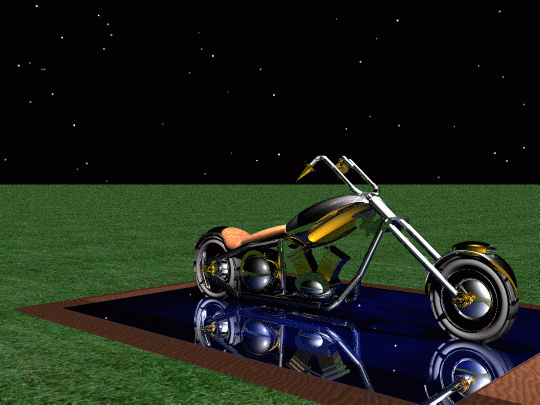
Well, the bike is a beauty, no doubt about it. Putting it on a reflecting square is a neat idea. The environment certainly is better than the previous one, but could still be improved upon. The lighting is much better. Overall, much more appealing. Keep going, you're on your way (you've got a bike, after all).
Comments 5
A conversation around the artworkSign in to join the conversation.
Experimentation is the key If you are not in any rush to learn, then the best way is to just keep on trying things. Since you have taken the trouble to come up with something yourself and indeed the mirror placed underneath the bike is a neat way of showing off your model, then I am certain that given time you will find out all you need to know. Somewhere on this site I included a rule of thumb with reguard to lighting *goes and looks*... Here's my rule of thumb. For matt surfaces and complex models have as many lights as your patience will permit and build up a nice even level of ambient light with possiibly one or two highlights. For reflective surfaces only one or two strong lights are required. For space, one light, strong and no ambiance. For underwater an aditional light were the sun is and soft shadows and ambience or use a ring of lights to simulate soft shadows (this is usually quicker than rendering soft shadows) see Horo's and mine tut's for light rings and additional sunlight. Underwater is a trial, the sky is very tricky to set up and with the soft shadows whatever way you get them it's torture to render. For outside scenes definately additional sunlight light (see tut) and for indoor, generally, strong lights for light sources and either a light right where the camera is for cheap ambience or soft lights within the volume of the room to represent light scattered from walls and ceiling. This is a good site to visit for specific informaton on setting up tricky effects http://www.bsmooth.de/BSolutions/ The nice thing about bryce is that there is always something new to learn, in a small way perhaps, but even after using the software for over two years - fairly extensively - I still find there are things to experiment with and plenty I would like to learn how to do better so that almost all of my images are in some way and experiment with something.
Lights Well, I for one would go over to David's (or Horo's- he has a translation into english if that's what you mean by "can't read") page and look at his lightrings tutorial, or perhaps just generally play around with lights and the multi-replicate tool.
lighting horo i can't read your web page what do you or david think that i should do to better light the model???
great this one is better then the first. you are doing good work.
Well, the bike is a beauty, no doubt about it. Putting it on a reflecting square is a neat idea. The environment certainly is better than the previous one, but could still be improved upon. The lighting is much better. Overall, much more appealing. Keep going, you're on your way (you've got a bike, after all).