FROM THE COMMUNITY COLLECTION
Paradise Scene A1
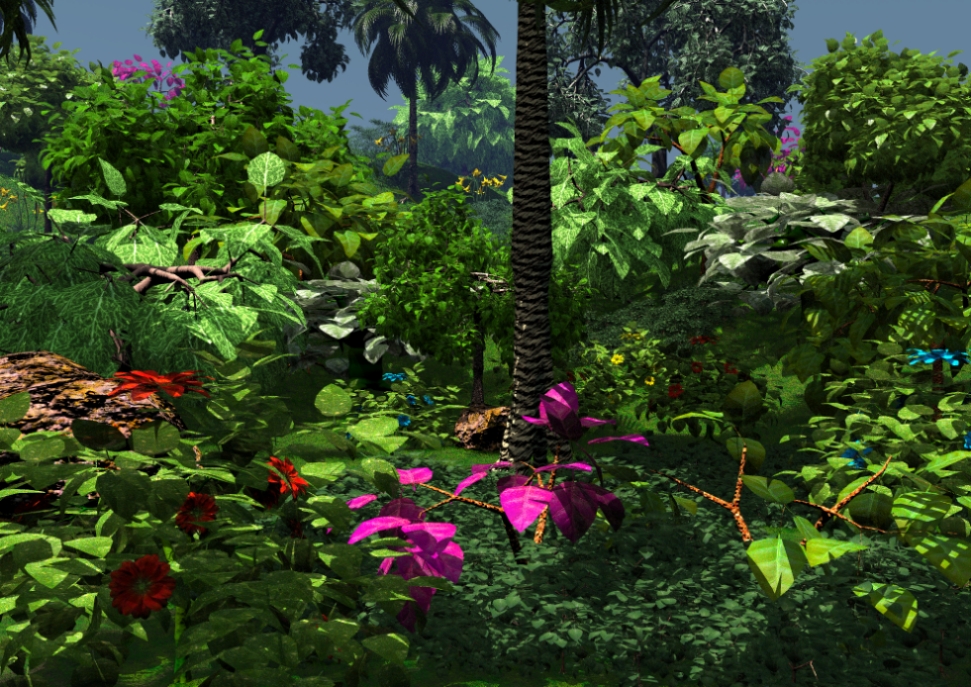
A touch more elaborate than the original, and less hazy. Lowering the haze makes everything in the scene feel closer to the viewer. I have added some taller trees to throw some shadows into the scene. The viewer is actually standing under a couple of palm trees at this very moment which is why the foreground vegetation has so many shadows. If you download the image and view it more closely the leaf effect I've been describing will become obvious. Due to the way this leaf transparency allows the light to penetrate so deeply into the scene, this scene is especially sensitive to effects such as haze. I feel this is another scene where soft shadows could tip it over the scale.
Loading unique views4,451 unverified legacy hits5.0 archived rating2006-06-12 added
Comments 3
A conversation around the artworkSign in to join the conversation.
This is it. Yes, the leafs now some specularity and look more convincing. I like this almost jungle-like vegetation picture. Rescaling: either render it again smaller (time consuming) or use a bicubilcal resampling in the graphics application. I think this gives the best results. I wouldn't apply DOF on this picture, I think it would spoil a lot of that detail that is in here. If you shy away from the long render times when using DOF, you might try rendering an additional distance mask and apply it on the picture in your graphics application. If the result satisfies you, it will be much faster.
compression issues still No depth of field, or other deliberate blurring was added. The original image was still slightly too large to upload even after compression, so I had to rescale it to 98%. In doing so, it blurred certain areas and left others at full scale and apparent sharpness. Almost a hop-scotch sort of shrinking effect and blurring. I did not want it to happen and I wish I knew how to avoid it. The original is so sharp and in your face. Close approximations are okay for now I guess. Someday I will assemble a web site where everything can be seen without compromise.
Better from the previous one and almost a hit. You are dealing well with the color gamma of the textures. Purple is a dangerous one, although here fits nice on the leaves. With shadows dropped all over the scene and sky with no attention-distracting clouds everything looks multiple times more close to reality and more appealing to the eye. Perhaps you can change the texture on the new tall tree's trunk. Now it looks a kind of "cut". The places where you blurred your image doesn't seem justified. You wanted DOF, turn it ON in the option menu. I know - this is 10h+ to the render process, but finally pays itself very well. Nevertheless the image is exceptional and I find it to my liking.