FROM THE COMMUNITY COLLECTION
Rhododendron Render Examples
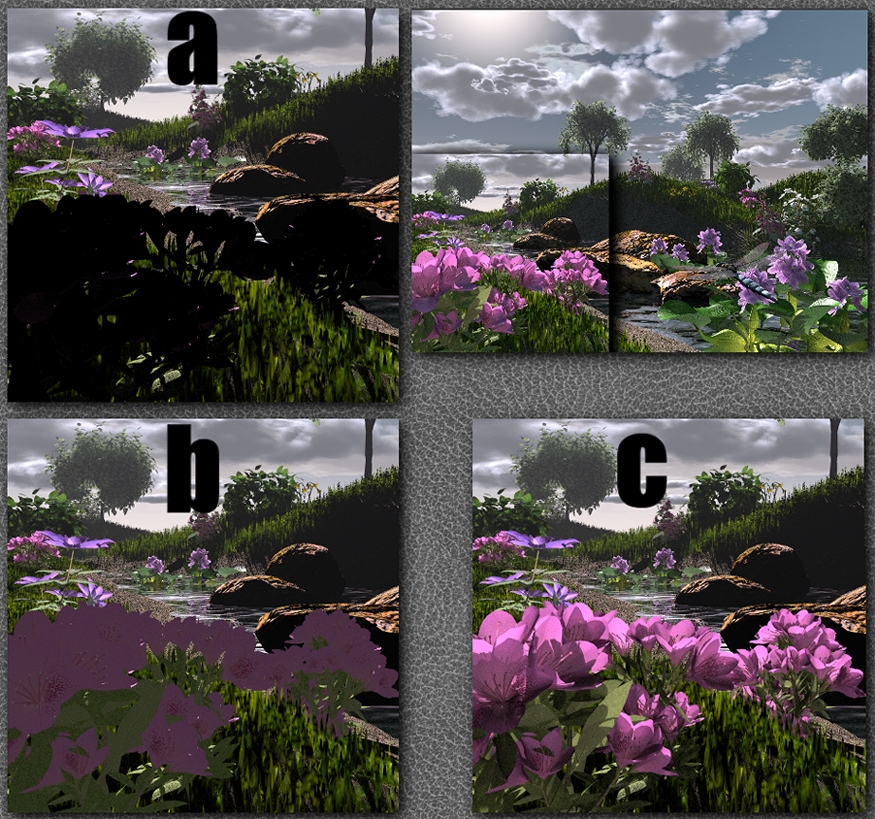
The proof is in the pudding, no? As per Richter's request for a side by side render comparison, I have submitted this addition to 'A Bug and a Brook." The grass and other vegetation are still tranparency tuned, but the Rhododendrons are subjected to some testing for the sake of permanently proving my point. This should clearly demonstrate the unquestionable 'LEAP' the reality level of the vegetation takes when my trick of sorts is applied. The lighting angle of this scene is absolutely perfect for this demonstration as it is back lit and full of shadows for the Rhododendron flowers. A sample of the original render is also enclosed for reference. Example A Rhododendrons: Settings: Diffusion 80% Ambient 0%Transparency None 100% OPAQUE Result: Due to the fact that the light is so low at only 20 degrees in height, these plants are obscured from our view by their own shadows. They have no transparency and could be made of cardboard for all we know, as light does not penetrate the leaves or petals at all. There are a few spots illuminated by the sun that are visible to us at this perspective, but otherwise, nothing is visible. Our instincts tell us instantly that this amount of darkness is wrong, so 99 times out of 100 we just apply a cheesy ambient like in Example B. Settings: Diff 80% Ambient 15% Transparency None 100% opaque. Result: We already know from the previous example that there is no actual sun light visibly touching the plants from our viewing perspective. So where have those nasty shadows gone? The ambient expression of only 15% causes the plants to glow no matter how little light actualy strikes them. This "glow" is better than nothing at all as in the previous example, but it is still very false looking to me, and I belive Bryce can do better. I even used the texture picture itself to express the ambient in hopes of making the ambient less flat. That's the problem with ambient, it's flatness. It mutes contrast levels. It looks very "painted", and 2 dimensional. It does not interact with it's environment because it is too busy "radiating" itself. All sense of lighting direction is lost, as ambient is so contrived and "alien". Better than nothing in this case... yes. But it looks like a joke compared to example c. Example C: Settings: Diff 80% Ambient 0% Transparency: 0%, but Controlled and Rigged to mimic living foliage and it's unique type of transparency and refraction due to it's mostly water composition. Result: Unmatched realism potential and an earth shatteringly different approach to solving a problem we all assumed was either solved satisfactorily by ambient or simply unsolveable in Bryce. After this side by side, is my excitement making more sense now?
Comments 5
A conversation around the artworkSign in to join the conversation.
now available to all About a week ago I kept my promise and uploaded some .mat files for all to use. Enjoy
soon to be available As I tend to be a long winded guy, I will post some sort of SHORT tutorial soon. I CAN'T WAIT to see what you guys will come up with when you have this powerful tool in your hands. The " transparency trick" requires different things when rendering tree lab plants than from other plants like those from 3d cafe. There are 3 different examples I'll have to show you all, as they are all important, different, and necessary. I'm trying to find the most straight forward way to show the world this effect. Within the next week or two I will upload a leaf texture or two to get the basic idea into people's hands. This "trick"can add a bit of time to the render as there are more ray hits to calculate due to the light passing through the leaves and hitting more surfaces. The wait is worth it. If you're in the middle of a landscape scene and want this trick NOW, then email me and I'll email you back with all of the information you need to render more realistic foliage. Till later.
Yes, Rashad, indeed! Example "C" shows it perfect. Thank you for the time spent on this. Keep 'em going, brother!
Of course your plants look better with ?trick of sorts is applied?. Just what is that trick?
Yes, your technique does indeed enhance the light in the flowers. I myself would like to give it a try and do some tests, so could you write a tutorial or something on how to achive this affect? Or, perhaps you've already explained it in full somewhere and I missed it.