FROM THE COMMUNITY COLLECTION
HDR Lighting Simulation
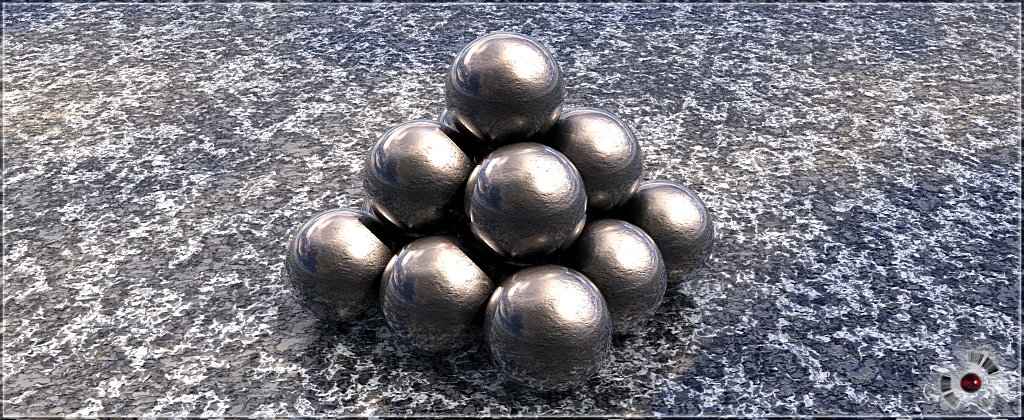
Well, it's nothing really fancy. I'm playing a lot lately with lights and textures in Bryce and, as we all know, there's no HDR option in our beloved software. I'm not exactly sure what kind of "final" result I'm supposed to achieve with this. Anyway here it is in front of all of you. Share a comment if you like :)
Loading unique views4,266 unverified legacy hits0.0 archived rating2006-07-30 added
Comments 5
A conversation around the artworkSign in to join the conversation.
clever magician Your use of layered spheres to accomplish your multiple texturing needs is clever magic. Soft shadows are truly the first step in solving most global illumination issues. But the material choices you have made are the other side of the coin. The chosen materials due to the reflection and so forth are interacting with one another alot more than usual, making everything seem more real. I believe the key to realism really comes down to the way the different elements within a scene interact and affect one another. The more interaction, the more internal consistency the image will have, leading to greater realism. What you've done looks almost like a radiosity setting. The only ciriticsm I will offer is that if you had tinted the light slightly toward yellow or purple, it might look a bit more like real light and less like an artificial perfectly white light. Anyhow, I am energized by this simulation. It makes me hopeful about possibilities in Bryce.
Above all I should say that this scene was specially "suited" for this effect. What I mean is that the so called HDR light here was mostly a result of a proper texturing. No matter how long or how hard I tried to get the specific reflections on the rough material, I always failed. And I knew that the best way to acomplish HDR is within those sharp and clean reflections, showing everything around our object (i.e. sphere). Then I recalled the case with "Necro's Eye" for the eye itself. Yes, the double-sphere method. One inside the other. Only this time the spheres were extremely closer to each other (the one inside was 0.01 br units smaller). Diamond tex outside, rough mat inside and voilla! I got my reflections without losing the rough mat. The final step was to create 2+ lightrings (thanks Dave:)) and position them as natural as possible. Rashad, I rendered the image on halves, each half in own br5.5 application simultaneously. The reason - my dual core CPU uses only one core for rendering, so I render both parts at one time. The right part took 3h40 min, the left ~ 4h50min in AntiAliasing Fine Art 16 rays/pixel. Thanks for reading the "novel" :))
The HDR lighting worked very well. However, the material on the ground kind of obscures the effect on the shadow. That's not to say that the ground material isn't very good- it's just not very effective.
It does look like an IBL lit scence, without having the HDRI rendered as backdrop. I know of programs that have an IBL option, but Bryce 5.5 has not. I wonder how you accomplished the effect. Nice rough material on the balls.
high dynamic range lighting I think the simulation is more or less effective. I am curious what technique you employed. Have you tried to create LDR lighting also? It seems to me like the next challenge, and even more difficult to achieve. I hate ambient expression so LDR would be fun. As HDR is usually used to simulate sunlight, I wonder if your tech will work well or efficiently for more complex outdoor scenes or scenes with more than one general lighting direction. The reflections are interesting here. How long was the render?