FROM THE COMMUNITY COLLECTION
Alpine Sunset
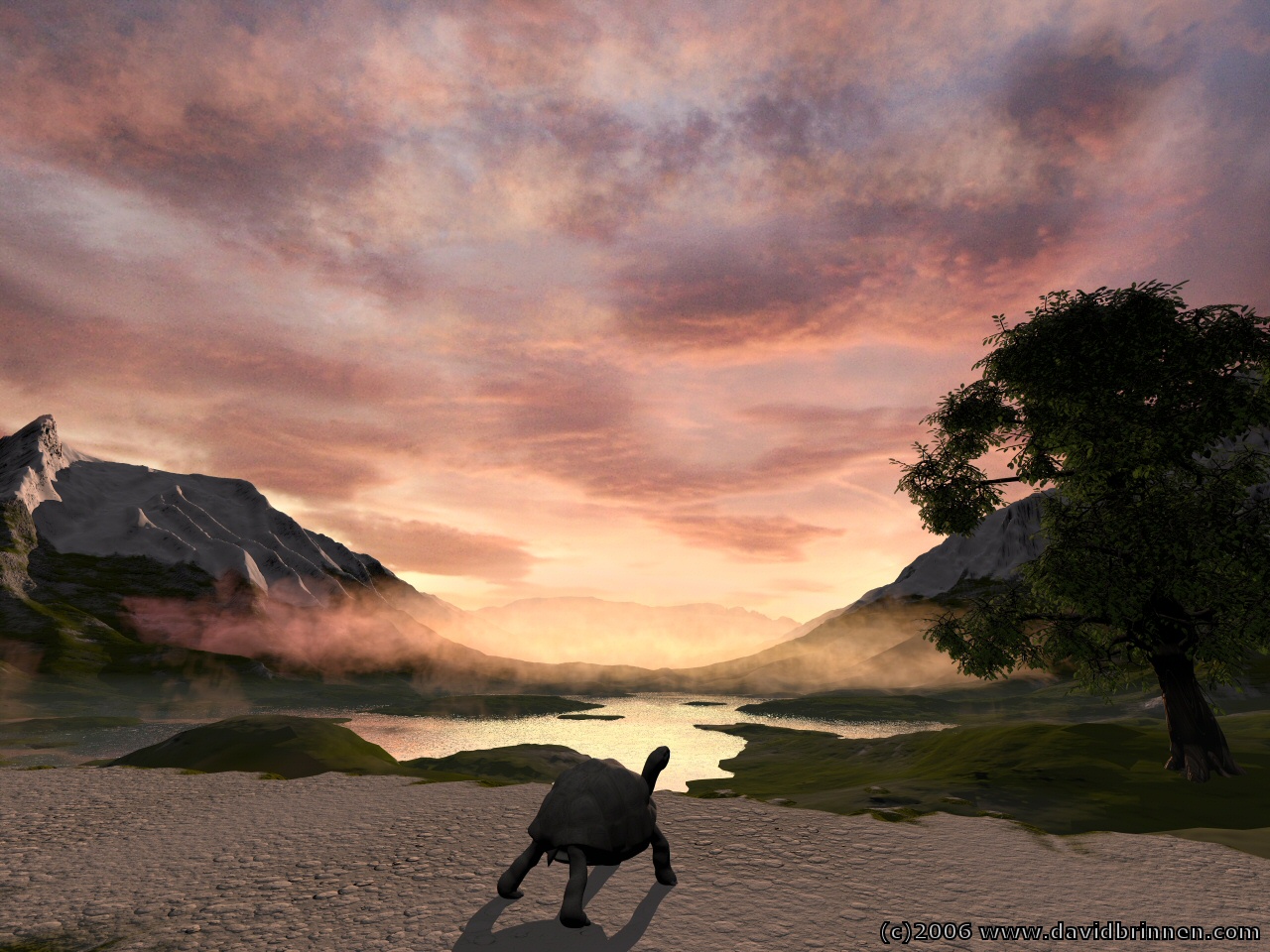
Alpine valleys fractal used for terrain. Standard bryce sky/light cobination. Utilised this evenings sunset (photo taken from my garage roof) to comprise a transparent cloud layer and a solid backdrop with volumetic orange space gas mat in foreground to create orange mist in the valley. DAZ Tortoice added on a whim. Leaves taken from TREE LAB leaf template 2 (rashadcarter1) in the X change. Origionally rendered at 2560 x 1920 but then reduced in PSP7 to half that size in an attempt to reduce noise in the render.
Loading unique views4,665 unverified legacy hits5.0 archived rating2006-11-04 added
Comments 8
A conversation around the artworkSign in to join the conversation.
The patches of water are easy when you know how. The water itself is an infinite plain. It is the dentedness of the terrain which turns them into "patches". I used the "mordor" fractal to generate the initial shape of the terrain, then processed it further with "mounds" and "errosion", finally tweaked it with the terrain brush, lowering the area in the middle to form the lake. Then it is a matter of sinking the terrain into the plain and watching the water level rise.
Very nice! It's so serene. How do you make patches of water? I have tried and failed. I'm open to all the help you can give. Your landscapes are masterpieces! In my oil paintings I usually stick to florals or portraits. Working with this program I am testing myself with landscapes first. I love the program but am unsure how to use other programs with it. I'm not very computer lit. My son helped me to upload my pieces to this site the first couple of times. I'm sure with time and patience my work will get better. Just keep on inspiring me with your beautiful work.
Thanks for the info about the tree. I forgot to mention one very small thing: move the turtoise (or is it a turtle?) a few pixels to the left or a bit more to the right. There is a very small part of water to be seen left of its shield and this looks like a stray pixel. It was probably the first thing I've noticed.
Thanks for the suggestions with the filtering, I know you are more familiar with these techniques than I. As for the tree, I think the subtle effect of the transparency with the leaves is playing a large part due to the sun being positioned behind. And the shape, that is one of the "Bryce Trees" > Special Acacia, that comes with B6. Many of the new trees are in fact multiple trees cobbled together, they work very well and as you say hide the shortcommings of the standard Bryce tree.
There are so many clever comments so that I concentrate on how it feels. The tree is absolutely phantastic! One would like to have it nearer, but that would spoil the setup. It looks very natural and this is not only because of the leaves (they certainly contribute) but the shape itself. Hard to believe it's a Bryce tree which always have a tendency of looking half starved and have too long trunks. Here, the typical Bryce roots are seen and the trunk looks short and stout. I like the light. I don't think the foreground is glowing, it catches the tinted light nicely. The clouds are also beautiful, the noise might be due to the limitted size of the picture used. Maybe you try to enlarge it first in PS using a bicubical algorithm and perhaps apply a Gaussian filter with a small radius afterwards. This might blur things a bit but the noise is removed. If the noise were from under exposition, it would have random colours with an emphasis of blue. The only thing I have quibbles about is the way the plasma fog interfaces with the countryside at left. It is not unreal how it looks, I just don't like it in this high contrast way.
sky dome Yes, I know what you mean about the sky dome. I had a similar issue in one of my images a while back. It's odd to me that the skydome light comes from 90 degrees directly above, no matter what angle the sun is positioned. In the end, I feel the sky dome is just about as offensive as the ambient channel, because it flattens all that it illuminates. I haven't used it even once since A Bug and a Brook. That scene is completely backlit like this one and of course the sky dome seemed like it was a good idea, but it sent the scene a bit too far into the blue/ purple ranges cooling it off too much. I intended for a slightly warmer render. The blue sky dome color was the problem. I was reading in the September Issue (#83 I believe) of 3d World Magazine about secondary lighting set-ups and how they are the best ambient lighting approach short of true GI, no matter what graphics program is utilized.
Thank you. Yes, the old ambient issue... well, in this case there was no ambient response from the material. But you are not wrong in your observation. Only in naming the guilty light source. Because I don't tend to use the ambient channel for anything other than glow effects, I more often than not rely on injecting a bit of light via the skydome colour which being directional has more effect on horizontal surfaces than vertical ones. I did debate over the path, and like I say, I believer you are correct. Originally I had the tree casting a dark featureless shadow over the path, but then that would have insisted the sunset be off to one side and as the sun is clearly in front... I was tinkering with a day scene, but I kept turing the image nearly grey when I was leaning towards realism and then pushing myself back to strong colour for the sake of art. In the end, fate provided an interesting sunset so I went along with that. I've not tried doing much with cloud layering before, however, I've been converted to the idea by Horo. The issue with using a photo material in this instance is that it is rather too "real" for the rest of the scene and the level of noise in the photo is far greater than that found in the render. Hence the post production shrinking tacktic. Maybe if all the components within the render were photo materials it would be easier to get away with it?
very nice. Terrific scene. Very pleasing composition. Nice use of the leaf mat and thanks for the mention. I think the transparency works well here. I hope now that both you and Horo have used the leaf mat others will use it, as it is very useful for realistic vegetation and can step up anyones foliage. It is essential. The cloud tech you used is effective somewhat, but perhaps it needs more repitition, as the layers are a bit obvious so the clouds don't look as complete as I believe they could. The detail in the clouds is great. It's amazing what a bit of real photography can do to an image. Very legitimizing. Curious, do you use secondary lights? I ask because I think they might help. You have an excellent eye and usually do a very good job keeping the ambient at bay, but trusting in secondarys instead of ambient expression avoids issues like those of the foreground sand. The sand glows of too much ambient. I notice the ambient not for it's brightness, but for it's flatness. Honestly, there will never be two people who agree on proper ambient values, which is why I ultimately don't trust it or the fact that it requires such individualized tuning. There has to be a less moody, less personal opinion type of an approach to shadow corrections. Something more accurate. Something mathematical. If you use secondarys, ambient tuning of individual materials shouldn't really be necessary at all. Just a suggestion. As always, great. Very few quibbles. Another beautiful render.