FROM THE COMMUNITY COLLECTION
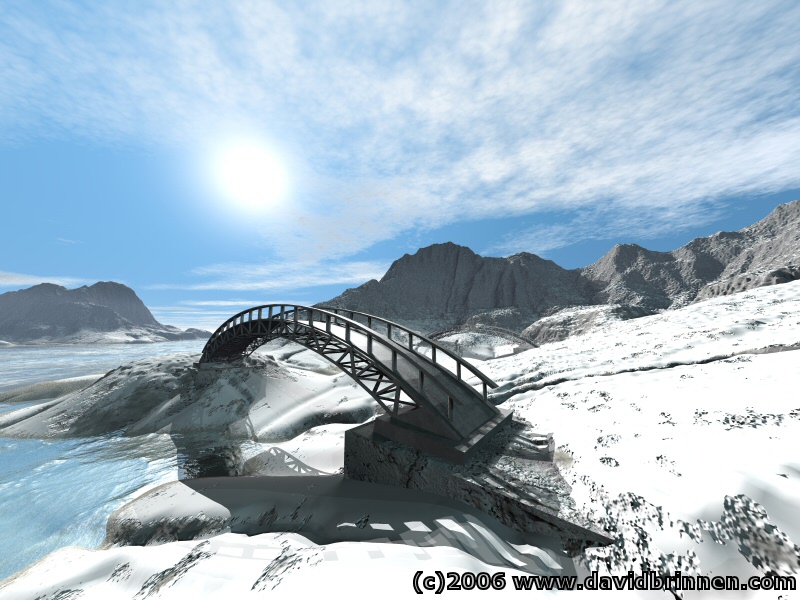
Two Bridges
This is not what I set out to create at all. This was going to be a tropical island rendered with IBL... but as is often the case, things didn't turn out as intended. So in this scene there are many lights, no ambience, no skydome, no sunlight. There is some evidence of shadow banding, the render time was only 1.5 hours, so there is time and room for improvement. The foreground water is applied to a terrain and is transparent. The background water is an infinite plane and is just reflective. This was done to save time as the angle of the camera at this distance to the plane would most probably result in relfection anyway, I figured I could get away with that. The terrains are 1024x1024 and there are two (not including the foreground water). The bridge was made in wings3D - bridge(s)... but they are the same. The sky is default bryce6 - which was abandoned later in the devlopment, but I believe is still supplied with the program. However, I did reduce the haze to 1 and move the sun around.
Comments 7
A conversation around the artworkSign in to join the conversation.
best water Really, besides everything else, this is the best water I have ever seen, it looks like its in motion and is very clear.
Thankyou Thankyou for your advice. Every little bit helps. I know what you mean about the skys. I really like the lighter ones better. Thats probably why my scenes look more like a Thomas Kincade painting. I will use less next time. Again thankyou!
Hmn... well, I think two things have to be considered closely for an image to look "real", asside from geometric considerations... since in reality you could manufacture anything of any shape, you would just accept that it was an odd example of it's kind. So I would say that the quality of the lighting is critical and the response of the materails being a very close second. I tend to choose skies that have a large component of grey in them, as opposed to being dazzlingly blue and in the materals use correspondingly subdued colours. This, to my eye, looks more natural and if you like "real". The sky I have used for this image was the "bryce6" default, however, it was considered too tricky for beginners to use. This has a blue grey balance of colour. As far as possible I try to do everything as much as possible, within Bryce. The most frequent post correction I do is to compress the gamma so as to increase the contrast range over the image - however, this is not necessary with many images rended with IBL > HDRI. So... to begin, before loading up your scene with models, put in a few key components and play with the lighting and the materals, keeping an eye to the nano-preview. When it looks good in th nano then at least you know that the first impression of the image is likely to be favourable.
Very real! I like your realism. My projects still look like I'm oil painting. I am trying to make the switch to more realistic scenes. It's not easy! Although you make look that way. How do I get mine to look more realistic? Or is it that like every artist has his/her own tecnique or style? I'm stumped! Is it in my choice of programs I use with Bryce? Or the way I set my Bryce up at the begining of each project? Sorry for all the questions, but I really want to learn and excel with Bryce. Thankyou for any tips or suggestions you can offer.
Oh - a tropical island in winter, that's cool. The water looks very cold, almost like ?glacier milk?, the sort of water that carries microscopic small floating sediment particles with it and is completely intransparent. This intransparency would be completely wrong on a tropical island, but at the brink of a glacier, very plausible.
water By the way the water looks great generally. I feel that it even appears to be foamy. But the bump seems slightly off in scale maybe, too low frequency for this scale. The fov may also be responsible for stretching out the bump. I think it's more real with transparency than without it.
great once again. There is no limit to what is possible in the hands of a lighting expert. Your lighting techniques are solid and probably provide you with a great sense of control and ease. My feeling on the banding is to either go soft shadows or don't. This scene is a perfect example of what I was discussing the other day of two version of your sun. One singular, and one made of a high count light dome. As you would carefully tweak them to match one another perfectly in intensity, you could render the entire scene quickly with hard shadows, then replace your singular with the light dome and plop render just those shadows that are prominent. I know it works because I've done it before. The key in this scene is that there are not very many shadows to follow or soften. Only a small percentage of the image would need re-rendering. A fast solution. I don't mean to take anything away from IBL, but it has a few issues such as specular ignoranc and transparency intolerance that make it somewhat ill suited for lansccpaces, that often have something transparent (water) ot shiny ( leaves). It's an odd issue as Bryce is known as a landscaper. Once again secondary lighting schemes are more stable and render much faster. Your angle of view of the sky is great. Perfect use of perspective to give the clouds a sense of depth. It's a quick trick anyone can use to level up their skies.