FROM THE COMMUNITY COLLECTION
Staplers and Jelly
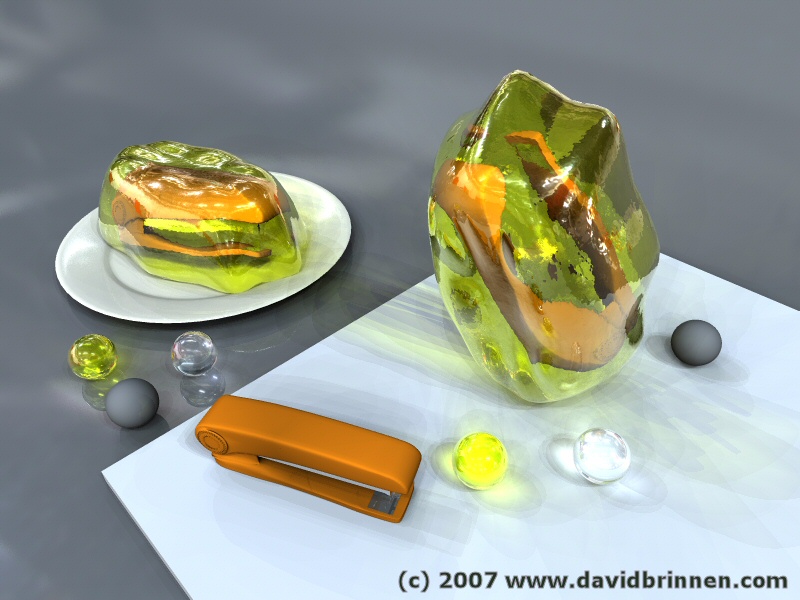
"Unlikely" jelly I should add. You may recall, possibly, some reservations I was having with the way Bryce handled transparent materials in RGB plastic pegs? Well, if not, then here is a recap. The addition of extra lights, be it, IBL or merely static point source lights seemed to be having an unlikely additive effect on the shadows cast by semi-transparent materals. What appeared(s) to be going on, is that the light passing through a transparent materal is not being realistically cut down and that while with a single light source this is not really evident when 100 such lights are employed the shadow cast is actually becoming artifically bright. This may be due, I suspect, to the way bryce simulates light passing through refractive materials - simulates is perhaps a bit strong, since if a lense is constructed in bryce while it may have a lenzing effect as far as the image that is seen to pass through it, it does not have a simiar effect on the light passing through it. See the discussion in Horo's "Linsen (lenses)" for greater enlightenment. Whatever the reason... that is secondary, let us consider the issue. Contemplate the shadows cast by the "balanced" jelly and then the three spheres in the foreground and those in the background. The three spheres show default grey, standard glass and "jelly" the foreground ones (excluding the grey - for reference) seem to "glow" the background ones, being on a darker material appear more natural. I would not expect this kind of behavoir from a glass sphere (unless it was a cats eye). The jelly shadows also do not convince me - the stapler is too defined for my liking in the shadows (as Horo suggested, like some kind of x-ray). Also, speaking of Horo, this was lit using his "treppenhalle.hdr".
Comments 7
A conversation around the artworkSign in to join the conversation.
No I was not aware of "sss" - that's all new to me. Very interesting. Also I had not considered the imact of TIR (which perhaps I should) so I'm re-rendering right now with a TIR of 6 to see what difference that makes. Caustics... yes, I think maybe that is what we are missing here? Again, my knowledge is sketchy. I'll have a look what wikipedia has to say on the matter. It is possible to force the IBL to use soft shadows for the simulated light sources by switching them on in premium render, but there is no control over the simulated distance from the simulated lightsource (even if a radius option is used) you are stuck with a default level of softening. Through some esoteric experiments Horo has determined the size of the hdr sphere... and so found out how far away infinity is... but I'm really not qualified to comment on that;)
. There is a material like that included in the presets with bryce, it does look like some sort of meet or skin, but it glows a bit too much without loosing sss affect.
sss The abbreviation threw me for a second. SSS is hardly mentioned around here because most don't know that bryce is capable of it. In this case, sss, is exactly what my transparent leaves are capable of. It is noticeable when you see the light pass through a leaf from behind causing the leaf to glow brighly on the underside, but does not turn to the leaf to water or crystal because of it's transparency. Materials based upon the "black nothing" procedural supplied by me in the leaf mats manages to ride a thin line between full solidity and full transparency. A magial effect to say the least. It can be used for ice cubes, skin, and the like. I plan to render a scene of a baby in the womb to illustrate the way the leaf transparency can be used for extreme effects like that transparent glow of a child developing so delicately in the womb. Technically, there should be no sss in the scene above because the jelly is very very transparent and should not scatter light the way a leaf or skin would. Good eye for that detail.
. SSS - sub-surface scatterin. It is used mostly when rendering skin, in real life the light enters the sking about half 1mm bounces around and leaves, SSS fakes that and renderes realistic looking skin. This can also be used for materials such as soap, milk, etc....
I think we have a fundamental "problem" here that is made more obvious the more light sources there are. Perhaps it may be that the light passing through a transparent material is not properly attenuated, as you suggest; or it gets trapped, pumped up by endlessly reflecting on the boundaries. How's the TIR setting? We might have to conduct some tests with simple setups that could help understand what's really going on. Remember the wine glass? It may be a related phenomenon. Nice pun, by the way. And gat - what's SSS?
hmm From the looks of this I'd say that the ibl will be fine with the transparency, but only at a much higher ibl quality setting. At such a high quality setting it would take a good while to render so much transparency. Caustic shadows don't soften in bryce unless throug ibl or soft shadow light sources. I would suggest a grayscale color to be applied to the transparency color channel instead of the yellowish one now. All of the shadows from the vertical one would be in grayscale and the yellow shadow would not stick out so much. If you are using secondaries I would disable the shadows. I don't really like the way the transparent spheres look on the white floor tile. Too bright maybe. Gat as far as I have heard most raytracers start their calculations with the perspective of the viewer, so as to avoid rendering pixels outside of the view and wasting time. There are light rays and there are shadow rays. Both require calculation. Because of the way everthing affects everything else through reflections and shadows, it's hard to think of a more efficient way of raytracing. Ray hits is also greatly affected by transparency and the number of light sources, and on the ray depth established in the render options. In scenes with lots of transparent leaves one ray can have up to six hits. By the way what is sss?
. Jelly has some SSS so it be very hard to make a render of it in Bryce if not impossible. Its really hard to tell what should look right in this image, the IBL is creating so many light points. Question: In the render report, a file that takes a long time to render will have a large number of missed light rays, up to 2-4 times as many then those that hit something. If the camera or the lamp/sun were to first detect where the objects are and then only shoot light in that diresction, would that cut the render time by a lot?