FROM THE COMMUNITY COLLECTION
Infinite City 6
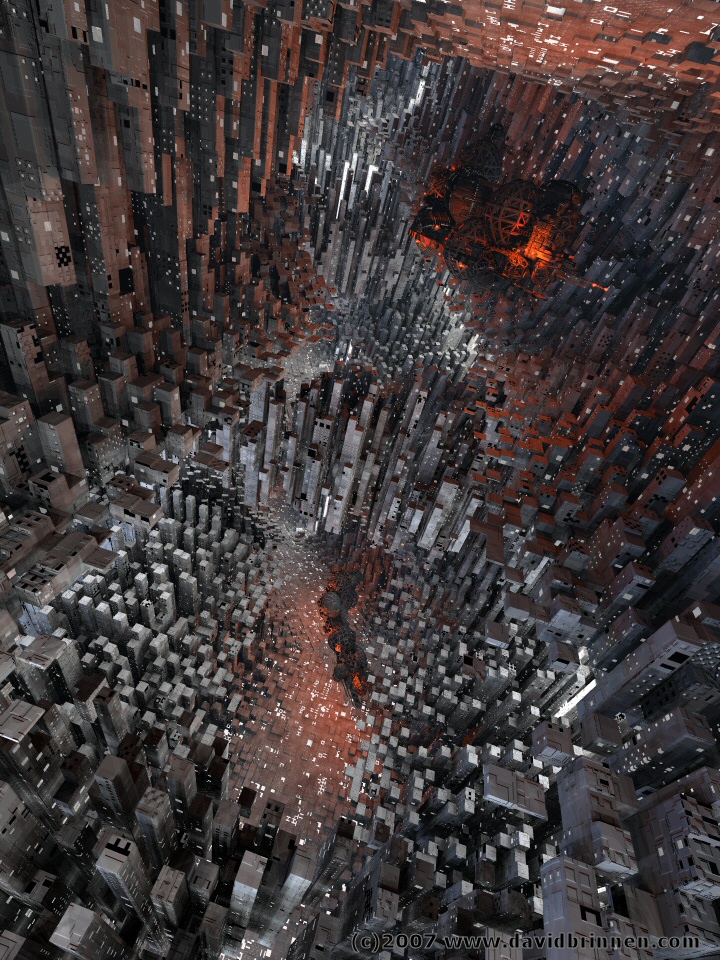
Inspired by Rashads "cement jungle" I fancied chancing my hand at some building materials. Being not as dedicated to city building as Rashad, I opted to use a terrain and a couple of lattices for my "buildings" - "Craft 9" has been thrown in there for a focus - some kind of building structure today - and to provide some red light. The whole lot sits inside a perfectly mirrored box and a plane mirror is angled inside the box to create a bit of a curve so the "vanishing point" is not visible. Thanks to Horo's moon_bluegrey.hdr for the lighting, which arrives through the sides of the mirrors. A final twist of the camera give the vetigenous drop.
Loading unique views5,349 unverified legacy hits5.0 archived rating2007-05-28 added
Comments 18
A conversation around the artworkSign in to join the conversation.
* Thankyou for your quick reply!
The paths... On either Horo's or my own website you will find bryce tutorial number 6 explains how to use a path to create a flexible tube. Otherwise, paths are not a fantastic lot of use in static scenes and I believe are mostly intended for use with animations.
* I have a question for you. How do you use the paths in Bryce? I can.t find anything in my instruction book on how to set them up and blend them in a scene. Thanx for your help.
* Wow! I get dizzy just looking at it! I'm afraid of hights. But wow! It is very well done. I am amazed at your work. Wow!
Thanks for that Horo, I just could not figure it out, I know I've been fooled by this before with the paint package, it is probably not sophisticated enough to recognise the difference itself?
Bryce 6.1 does export 16 bit TIFF. Though the handbook states terrains are 8 bit by default, I think that's wrong. Internally, they are 16 bit.
. Yeh that was one of the new future the import of 16bit files.
Maybe not. Internally I understand that bryce has opperated at 16 bit level since 5.0 but the export option was 8 bit. In the experiment I just performed, my paint package seemed to think the export was 8 bit. To test that the internal working are doing their 16 bit part, take a curved smooth terrain, export and then inport and steps appear where there were none before. I wonder if it will accept 16 bit tiff even though it can only export 8 it seems? Who knows?
Linux By the way does anyone know how I can run Bryce on Linux if I was to make a switch from windows xp?
.. I am kind off sure that bryce can't produce 16bit tiff files yet.
Hmn. Now you are asking... so far as I know it's 16 bit all the way in 6.1 so I guess it is 16 bit. But well... I could be wrong about that. It's not something I have much contact with since I very rarely meddle with the export import options.
.. oh, ok, what about 16bit? The default bryce terrain is an 8bit tiff.
Thanks. Yeah, well, this is the beauty of working on the very edge of abstraction - No one can say, yeah that's clearly wrong, because it is not really real anyway - it's a bit of a liberty really. But well, it was a fun image to make. The lattices Gat with their irritating horizontal lines. Well, in this case because the last opperation performed on the terrain was the "mosaic" function (the Alt of posterize) then in theory the sides were infinitely steep (in theory) even still the lines are present but given that and the evenness of the lighting, that has hidden them effectively.
. Looks like a dark city in the future like the movies when there many gangs in NY something like that, I like the texture of the buildings very nice job!!
This is a city within an planetoid. Notice how no space is wasted, buildings in floor and cieling. Perhaps artificial gravity is used to allow cieling dwellers to stand as if the cieling is their 'floor'. Then again maybe not. ;-) I also find the changing dimensions intriguing. Unless there are 'citizens' of different sizes that need scaled down accomodations. What's oddest is seeing your ship suspended within this cavernous metropolis. How on earth..... "This isn't Earth, silly." Shut up! Like I was saying, how on Earth did the ship get in there? Some sort of transporter technology? "Reality to spek. Reality to spek. You are venturing too far into the Nexus of Perplexus. Abort mission and return at once!" OH FOOEY! You're no fun anymore. ;-)
Nice work! The texture is awesome indeed. Terrains are very capable though they don't handle curves very well unless the terrain is super high resolution and therefore costly in file size. The lack of visible sky may be the reason it feels underground. Either way, it is so very cool. The crafts are hardly visible which is a good thing I believe. I like the sense of complexity.
Mind-boggling. As gat says, looks like an underground city. There are parts that pass superbly as conventional urban districts, around the lower left corner. Excellent material, interesting lighting setup. Not an everyday picture.
. First, excellent texture. That bump mapping really gives a flat cube another dimension. Lighting and structure or mirror of objects makes this look like an underground city, through some more order would have being nice. Great job! Question; How did you get rid of the horizontal lines on the sides? When ever I pull something straight up with a steep edge I get those lines on the sides.