Alternatively, composit the image in layers, render a distance mask using the masking option and use the mask to cut up the rendered image and process the parts you want blurred in a paint package and recombine them once the effects you want have been added.
IC
icecreammanArchived
I agree, perhaps a cliff jutting out from the bottom of the scene with grass/rocks/etc. on it with DOF enabled and set to those would be nice. I see what you mean about the size. In some ways I almost liked the image without DOF anyway, plus the scene takes a long time to render with DOF enabled on Premium AA. I may just leave it as it was with less haze and no DOF
DA
davidbrinnenArchived
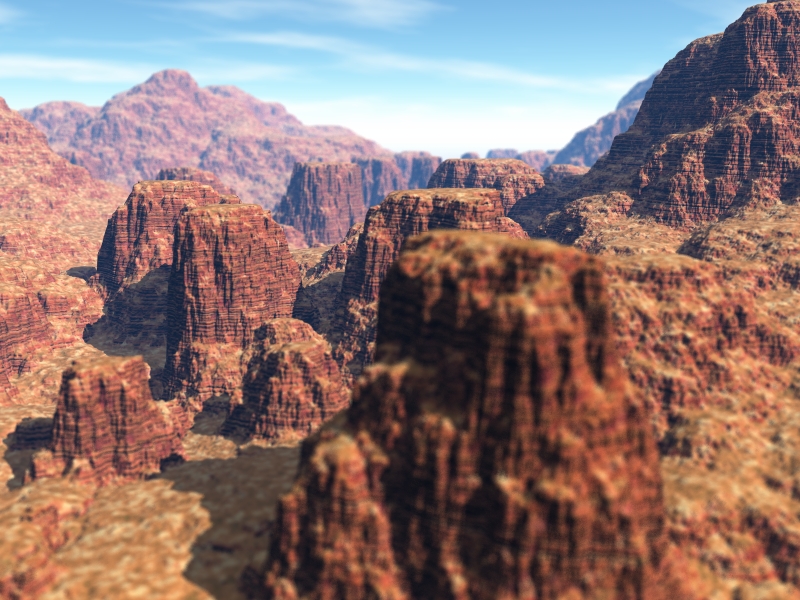
Nice render, but as stated, the DOF is miniturising your scene. The only way I can think of around this problem and still use DOF is to feature something small very close to the camera, like for example, a bug or a plant, this can be either in sharp focus or blurred as the foreground rock appears. This is there to "explain" why there are things out of focus. Remember, that mostly, everthing from about 11 feet to infinity is either in focus or out of focus for the eye, therefore, if there is a change of focus then the brain says it must be taking place pretty close at hand, which means, for that forground rock to be out of focus as it is, it must be almost within touching distance from the viewer, which means it can't be bigger than a barrel... and so... you see how this plays havoc with your sense of scale? Realism asside, the render is very pleasing to look at.
TI
tina gazconArchived
*
I like how you placed your mountains, but your DOF dose not look right. It does make your mountains look like a miniture set. I have'nt been able to master DOF yet. Don't get discouraged, just keep practicing with it.
HO
HoroArchived
The haze setting has improved, though.
GA
gatArchived
.
Got to be careful with DOF, now the image looks like the landscape is tiny. Can't have dof in front on images like this.
Comments 6
A conversation around the artworkSign in to join the conversation.
Alternatively, composit the image in layers, render a distance mask using the masking option and use the mask to cut up the rendered image and process the parts you want blurred in a paint package and recombine them once the effects you want have been added.
I agree, perhaps a cliff jutting out from the bottom of the scene with grass/rocks/etc. on it with DOF enabled and set to those would be nice. I see what you mean about the size. In some ways I almost liked the image without DOF anyway, plus the scene takes a long time to render with DOF enabled on Premium AA. I may just leave it as it was with less haze and no DOF
Nice render, but as stated, the DOF is miniturising your scene. The only way I can think of around this problem and still use DOF is to feature something small very close to the camera, like for example, a bug or a plant, this can be either in sharp focus or blurred as the foreground rock appears. This is there to "explain" why there are things out of focus. Remember, that mostly, everthing from about 11 feet to infinity is either in focus or out of focus for the eye, therefore, if there is a change of focus then the brain says it must be taking place pretty close at hand, which means, for that forground rock to be out of focus as it is, it must be almost within touching distance from the viewer, which means it can't be bigger than a barrel... and so... you see how this plays havoc with your sense of scale? Realism asside, the render is very pleasing to look at.
* I like how you placed your mountains, but your DOF dose not look right. It does make your mountains look like a miniture set. I have'nt been able to master DOF yet. Don't get discouraged, just keep practicing with it.
The haze setting has improved, though.
. Got to be careful with DOF, now the image looks like the landscape is tiny. Can't have dof in front on images like this.