FROM THE COMMUNITY COLLECTION
Lego Helicopter
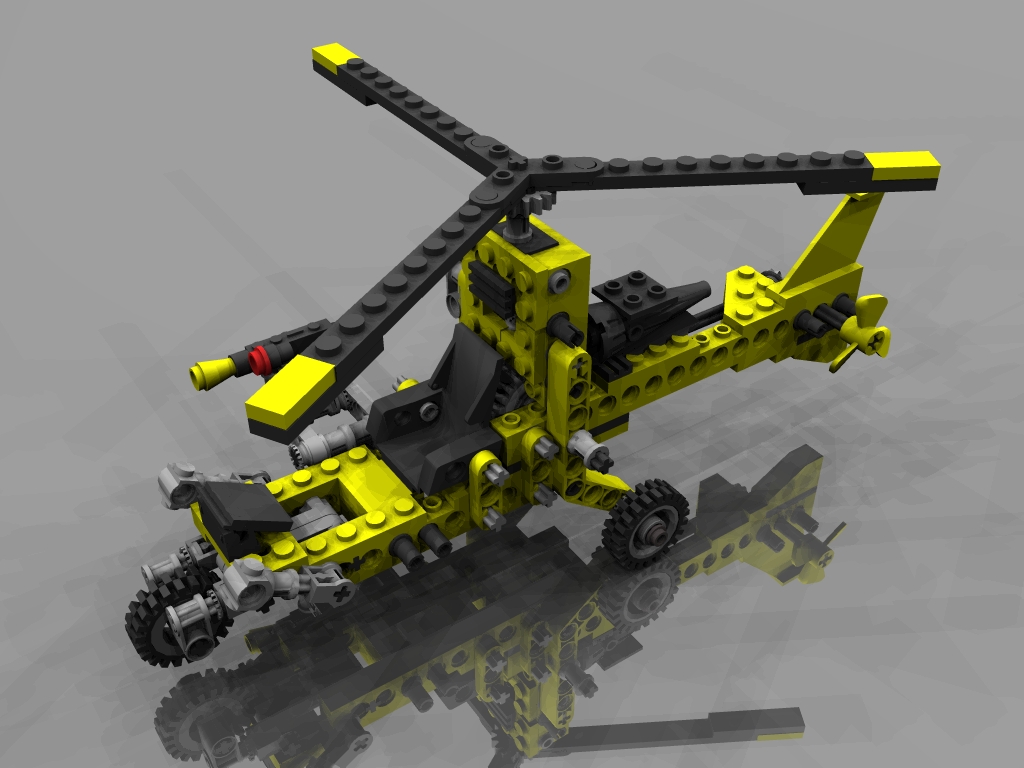
I've been playing around with a freeware Lego modeling program called LeoCad, and I created this Technic Helicopter from instructions I had laying around. It's lit with a global illumination light semidome. This was a fun one.
Loading unique views7,502 unverified legacy hits5.0 archived rating2007-06-13 added
Comments 10
A conversation around the artworkSign in to join the conversation.
OH COOL!!!! Can I take it for a spin? LOL Is that some kind of jelly bean auto-cannon on the side of the pilot's seat? I LOVE IT! ;-) 5/5
One thing I might do is use a matte surface with Soft Shadows. I'd have to create a new scene and set up the lights and camera again, but that's not too much of a problem. Thanks for the comments!
* Very well done! The only thing I saw was the same thing David mentioned about the front tire. Other than that excellent! 5/5.
An excellent piece 5/5 - I image everything that needs saying has been said, my main quibble would be that to me it looks like the front wheel is hovering off the ground. In this case I think the reflective surface is possibly redundant, but that I think is a matter of taste. But a matt surface would improve render time!
The program is easy to use, at least if you just place a few bricks. I'm already nearly as good at it as I was with the real thing when I was 3 years old. Thanks for the link! As for the shadows, soft ones could help (also to increase the render time dramatically), or a bumpy material for the ground plane to "smear" the shadows a bit.
. wow, really amazing model, I got to try out the program to see if I can use it to make some sort off robot. really nice job
The only reason I used a radial dome is because I have only Bryce 5.0. I'm looking to upgrade, but for now, no IBL or HDR, or HDRI capabilities right now. Also Horo I am not quite satisfied with the shadows. A multitude of radials creats lots of shadows, especially off the helicopter blades. I'm not sure quite how to reduce all the shadows, because turning off Cast Shadows on some of the radials doesn't look quite as good. I'm looking to kind of blend the shadows together if you know what I mean... FYI-This model is also for sale at turbosquid.com. More to follow!
Great job! Looks absolutely convincing, very good lighting. My quibbles are with the ground. Reflection looks good, shadows do not. Perhaps a bit of transparency with something below the surface. Minor quibbles, though. Rashad is right and I (think I) said it before, IBL is not the choice for lighting a scene in each and every case. Here I wonder, though. If you do not want specularity, why not use a light dome made from an HDRI. Using a graphics program and HDRShop, you'll have a dome within a few minutes. Just thinking aloud ... 5/5 in any case. The model is excellent.
The global illumination light dome is the right way to go. I use one that is 10 times the numerical maximum in size the program allows. The lighting you've applied here is very good, and best of all you can have specularity. Modelling is terrific, texturing excellent, all is well. I would add a touch of specularity to the material, but the more lights you use the less the specularity can respond to an individual lights. I wonder what would happen if you used this lighting set-up for more complex scenes, I think you will like the results. I really like the lighting and it proves once again that ibl is a great tool but it is not the only way to creat a global illumination set-up. Good old radials set up in a dome can do the same job more or less. Just avoid pure white lights. The ressish tinted lights you use are the right direction, just with a little less saturation perhaps than you usually use. With colors the light dome will look alot like an ibl set-up. Great work. 5/5!
. I like much your design, I know it is difficult to create something with the pieces of lego, worse even doing it in bryce, good work.