FROM THE COMMUNITY COLLECTION
Deflection
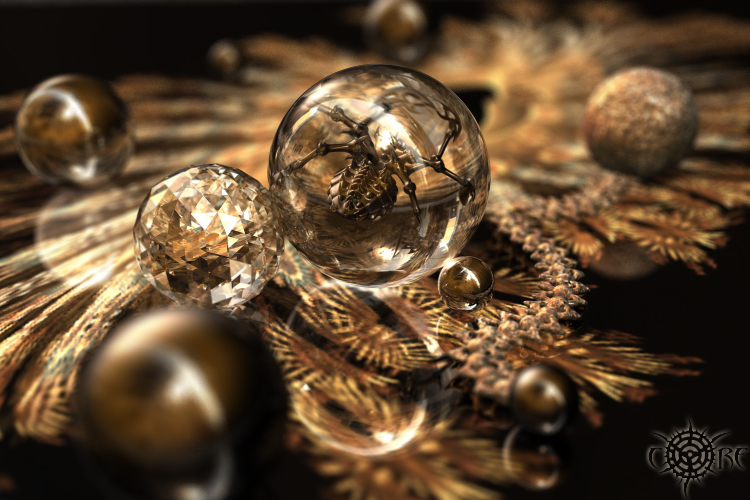
This is a mixture between Bryce and Apophysis (I was beginning to forget how fun it is to work with Apoph.renders). So the floor here has such render (1280x1024) plus a bit of reflectivity. I sqeezed everything out of Bryce as far as dof and tir are concerned, all max values 256rpp, both ray & tir depth 48bit. All the textures are bryce-made (excl. the floor); good ol' "Haematite" used on the 2 nearest spheres, on the little infector-spidy and once again with combination of diamond material (1 sphere into another), where haematite-sphr as you probably remember is 0,1br units smaller. The reason - improved depth reflections. The scene is lit by one coloured lightring left and above, and japan_alley_final.hdr which I have from unparrent dot com. Since the floor was reflective enough, I rendered the pic without shadows and increased the render speed ~3 times.
Comments 10
A conversation around the artworkSign in to join the conversation.
* Thankyou so much for your needed knowledge you guys! I'm truely greatful for all of your help. ; )
Tina - DOF Just an addition to what richter correctly described. There would be a formula, this is optics after all, but Bryce has queer units. The lens radius ought to be the lens diameter. It is like a camera: the more you open the diaphragm (say f-stop at 2 or 4), the more you narrow the well focused range - which you adjust with the method richter describes. Now if you reduce the radius (the diameter of the lens, or f-stop 16 or 32 for a camera), the larger the range of focus. So start with the default. If you are not happy, make that misnamed radius slightly larger to blur the render even more or make it smaller to reduce the DOF effect. Ever heard of a camera obscura? Take a cardboard box and make a hole in it with a pin. You get a focused (though very dark) picture, make it larger and all gets blurred. Hope this helps to get you started.
my "short" tale One is trully happy when there are others who can appreciate the effort put in his works. That one would be me. Thank you all, guys! Thanks! I always liked the dof option, the idea of dof. It's like the physical incarnation of the human's ability to concentrate upon something, and all that is around will blur or fade out the matter. Sweet, isn't it :) Icecreamman, moving those two front spheres to the back I thought will cause too much empty space in foreground and it felt like off balance. So the spheres are in front having just a faint reflection and "helping" this balance. Horo, David, well it passed through my mind that the dof might be slightly "overboard" here. And it was even worse before I reduced the lens radius from the default 0.1 to 0.08 (having the radius even lower was equal to losing the dof effect). And I really like what happens when Bryce is rendering something, anything with maxed quality settings. This leads me to Tina's questions. How do I calculate the dof - i.e. you have 3 objs and you want to clearly see the middle one and the other 2 to stay out of focus. It is simple, you select the middle one (or any other you want the camera focus on), then go to the render options and (with Premium->DOF turned on) click on "Set to current selection". This will automaticaly adjust the focus on the selected object and you're done! The quality-amount of grainyness later where the dof will occur is controlled by the rays per pixel values. So far Bryce supports up to 256rpp which is nice, but also slow to render. I recall a little trick from David (I think) long ago when he used an object to help him Only to set the depth of field where he wanted. Then erased this object. Funny but I've never thought of that :) Lens radius in the dof option-menu sets the angle of dof blurring - the larger the value of radius, the more blur you'll get over the unfocused objs. Note that the "set to current sel." adjusts only the focal length, not the radius. That's because the default rad. of 0.1 works very good in 90% of the cases. The total internal reflection (tir) is literally describing the thickness, the solidity of a transparent object. When I want something to look like made of glass/crystal, I first choose a material with a proper refraction (anything above 150 will give nice results) and then turn On the tir in the render options. The way I understand the tir depth is as follows - the larger number you use here, the more internal reflection you'll get and the more glass/crystal-like look you will achieve. Less or no value will result in more plastic look, see David's render http://www.bryce5.com/details.php?image_id=1431 for it is a fine illustration. The ray depth (personal experience) controls how far within the transparent object the light-sources are penetrating and the way they're refracting (enough to trigger the TIR), the subject matter isn't directly related to obj's transparent abilities. Thank you for reading all this, I'm always open for help and hope the info was usefull.
Brilliant! This is a goregous piece Richter! I am awed by you works. I would like to try my hand at DOF and the use of TIR. How do you calculate DOF for making things blurred in front? What is the ratio I should set it at? I tried it once in a sample and it did'nt look very good. I figured maybe theres a correct formula to use. I don't have any literature on DOF. Also what should my TIR be set at. I keep mine set at all times at 2. Any help would be appreciated. Thankyou : ) 5/5
Beautiful render, pleasing range of colour and good contrast. The DOF is stong for my tastes also, but that's a matter of choice since you clearly have the skills to not be dictated to by the software. The ground looks almost like straw - or maybe feathers. Excellent. 5/5.
Very very nice colours. The spidery thing in the ball is a bit creepy but the colour compensates nicely for that. For my taste, DOF is a triffle too extreme, but that's just me. Hard to imagine how this could be improved, hence 5/5.
Only you Richter, only you can get these results out of bryce at will. Amazing! I really love this work. Exceptional! So glad you're back in action!
. Gr Great render, lack off shadows doesn't hurt it any at all. 5/5
nice impressive work it is like thay are on a fancy bag of some sort good use of dog and good woek
Wow. I forgotten how much I liked abstracts. It looks a little weird with the DOF blurring the front spheres and the background items. I would move the two front spheres to the background. Otherwise, good work.