FROM THE COMMUNITY COLLECTION
Using Gloss Coats to Stimulate Specularity
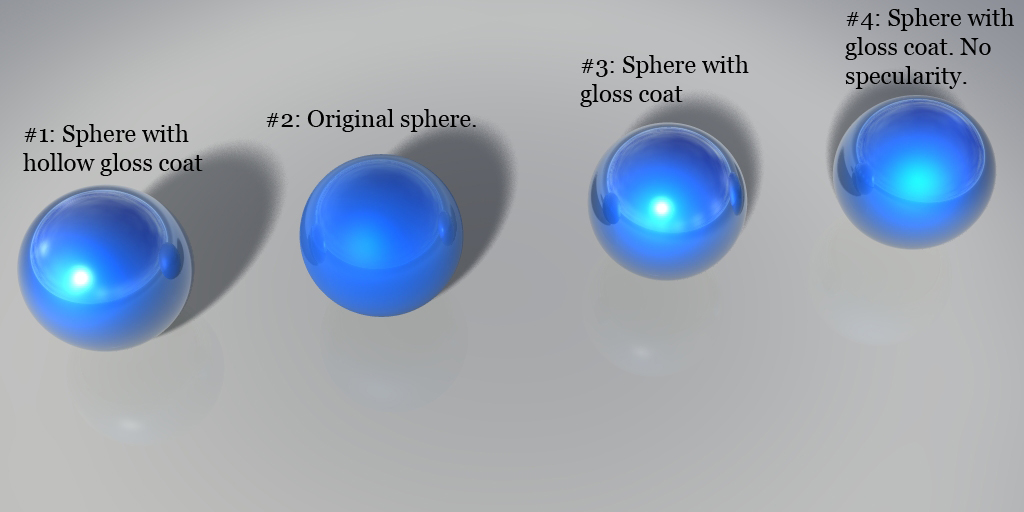
Here I demonstrate the use of Gloss Coats to boost specular response. A gloss coat layer is just a duplicate of whatever you want to add gloss to, made larger by 0.01 bryce units, and the "Standard Glass" material applied. All of the inner/main spheres have the SAME metal texture applied. From left to right: #1: Sphere with gloss coat shell. Negative and positive booleans to create a hollow gloss coat. #2: Original metal material. No gloss coat. #3: Sphere with gloss coat. #4: Sphere with gloss coat. Gloss coat has no specularity. Which one do you think looks more real???
Loading unique views4,545 unverified legacy hits0.0 archived rating2007-08-08 added
Comments 3
A conversation around the artworkSign in to join the conversation.
Gloss doesn't add much to the render time, but exact times I'm not sure. I'll let you know. By hollow, I mean 1 positive sphere with "Standard Glass" that is 0.01 times larger than the metal sphere, grouped with a negative sphere, "Standard Glass", that is the same size of the metal sphere. Essentially, a the gloss coat is a hollowed out sphere instead of a solid sphere. I don't really think 1 and 3 are much different. But I thought I'd try it out just to see. Yes I could use transparency and refraction, etc., but that would involve caustics and possibly longer renders, so I think a gloss coat would be easier. Especially since it doesn't boost the render time that much.
Working in layers has many benefits. Myself, I'm not sure I can tell the difference between example 1 and 3. What do you mean by "hollow?" As an added test, could you produce these specular bright spots without the layering? It seems to me that the blue ball itself could be made to "shine" exactly as the water ball. The thing to keep in mind about transparent water materials is bryce is that the render engine automatically calculates a certain amount of reflection when transparency and refraction are both engaged.
This is an excellent test, and one I've been wondering about... turns out that specularity doesn't actually happen, it's just a by-product of reflection, what you've illustrated here. Then again, Bryce specularity is really useful by any standards, so I think this technique should be reserved for making, well, a glossy effect. Could we see some render times for specularity vs. glossiness, to get an idea of the time involved?