Richter thanks again for you comments. I will need get this scene out and redo until I can get something absolutely stunning. Thanks for the links to the show room cars as it does give a person an idea of what to be striving for.
RA
rashadcarter1Archived
Render,
Way to go man! Wow, that is really taking control of your lighting! I meant to comment days ago on this but I started a new job and have been extremely busy. Has it even been days since you uploaded the image? I'm going crazy!
The first thing I notice is the lack of shadows, even directly underneath the car. Make sure that all lights are set to cast shadows. Realism if it is your goal means faking the bounce of your primary lights with secondary radials or spotlights. Bryce does not calculate bouncing light energy as you well know, it can only mirror the colors of other objects via reflection. Only with blurred reflections does this give the false "impression" of light energy bouncing. Thus the need for primary and secondary(ambient) lightsources. You must keep in mind the functions of each. My only suggestion is that you use the secondary light to correct the deep shadows only creatd by the primary light source. This does not mean brightening the shadows too much. In this case you do not have many visible shadows so my feeling is that the lights are all very similar in intensity, too much to specify which lights were primary and which were secondary. Also likely not all lights are casting shadows because I do not see much banding and based on the number of lights used I would expect to see banding. Though you did not set out to render ibl, it seems you have used a light dome of sorts so it just comes down to deciding on a bias of light intensity for greater depth perception within the 2d image.
In the Studio Apartment scene the secondary spotlights help tell the story of the primary light coming through the window, that is all but it is profound. Notice that there are still deep shadows in the image. Deep but not pure black. The intensities of the secondary lights get weaker with distance from the primary source. In programs with GI this is calcualted mathematically, in the Apartment scene it was approximated by eye.
Another big difference that David points out is that you are dealing with reflection in this case. The Apartment scene most of the materials are matte except for the hardwood floor. Reflection is like adding additional viewers to a scene, the raytracing grows substancially. This is where the time factor comes in.
Horo hit the nail on the head, you have gained alot of practical lighting experience through this exercise. I think that if you wanted a photoreal image you would need to restrict your strong lights to one area of the image and use weak lights to lighten the shadows of those darkened areas only.
I would be willing to send you the source file for the apartment scene so you can see exactly what I did. Surely this would shed some "light" on the mystery. Surely also, I oversimplified the steps taken in the Daz3d bryceforum"Photorealistic Lighting in Bryce: How and Why?." The goal was to keep it simple but also to encourage others to find their own solutions, just as you have here. I am so very proud that you are willing to take my advice.
I consider this image a step forward as you will gain the knowledge to use the lights more wisely through this experience.
Also, if you have direct lightsources coming from many directions you may not need to worry about ambient lights because the many strong lights from many directions would overpower the subtle bouncing anyway.
One more thing is the color saturation of the materials. David has a keen understanding of this but I have only recently come to understand it. Full 240 saturation of colors in the color pallete in the materials lab looks unreal. The purple, red, blue, I am nearly certain that saturations are very high likely 240. I like to lower saturation to no more than 100 for realism, as real life is never at full saturation.
Keep it coming man!
RE
Render ManArchived
Now that I think about what David was saying about Bryce lightsI was trying to achieve the impossible. No wonder I struggled with this for so man hours.
And Horo I might say this scene was not so convincing to me but still wanted to post and was glad I did or I would have been working on it for many hours more.
RE
Render ManArchived
Most of you remember reading Richter's comments on the scene were I had the two sedans together called (Car Show) http://www.bryce5.com/details.php?image_id=3085. I am going to past his comments here.
"but remember that shiny surfaces isn't always necessarily high reflective, specularity is the "hidden" factor. To prove this - look at the top part of the headlights, the upper rend shows traces of spec., that are not present in the lower rend. The case with the car paint is almost the same, though here I only see a little bit of difference in the spec. intensities. I can suggest you to try through spec. to "reflect" as many lightsources from the surroundings as possible. This way not only the paint, but also the curves of the brilliant Chevy Sedan will pop up nicely and the front and back left mud-guards/fenders will be clearly seen. If you're not concerned about the render-times, you could go for an Uffizi HDR backdrop reflection over the car paint."
This was the goal that I was trying to achieve. I did ask for some suggestions on the lighting were my Car Show scene in the forum and Horo suggested using the idea from Rashad's lighting scene in the Studio Apartment Scene but did not have much success.
So I hope this helps you to understand what I have been trying to do for the last week or so. And yes Horo I am learning allot as I have tried many different lighting arrangements. But need some tips on how to light this car or some other object without hdri or sunlight just to see what car setting.
After all this I think some great effects can be done with less lights and placing them in the right places.
David just read you comments again as was wondering if Richter's suggestion on reflecting light in Bryce does not work.
DA
davidbrinnenArchived
Like Horo, I feel it would help to know what you were trying to achieve. As a rule of thumb, I try not to mix large numbers of light sources with very reflective surfaces, the reason being, that in reflective scenes the bounces from the reflections help fill in details about the geometry of the scene for the viewer, with matt (in other words non reflective) surfaces, the shadows take on that roll. In bryce light does not bounce. This is a great dissapointment. Nor does it refract. The only bouncing and refracting that takes place happens to the rays comming from the viewer to meet where the light has hit part of the geometry. Which may sound rather weird, but if you can get your head around that then it helps with working out where to place lights and such. Here the lighting is so even and the surfaces so reflective that only in front of the driver is there some useful shadows forming. However, it would be wrong to criticise the lighting without knowing what your aim was.
HO
HoroArchived
Happens to me quite often, that the img description is empty. Must have to do with copy-paste. I've also noticed that my comment is not accepted when I use one single wrong character.
With all that trouble you had with that many lights and accordingly long render time, the result not fully convinces me. I have to admit that I don't precisely know what you were after. I like the interior most. However, lighting is difficult to get right and the experience you've gained with the creation of this picture might prove that it was worth the trouble. After all, lighting is at least one half of an artwork.
RE
Render ManArchived
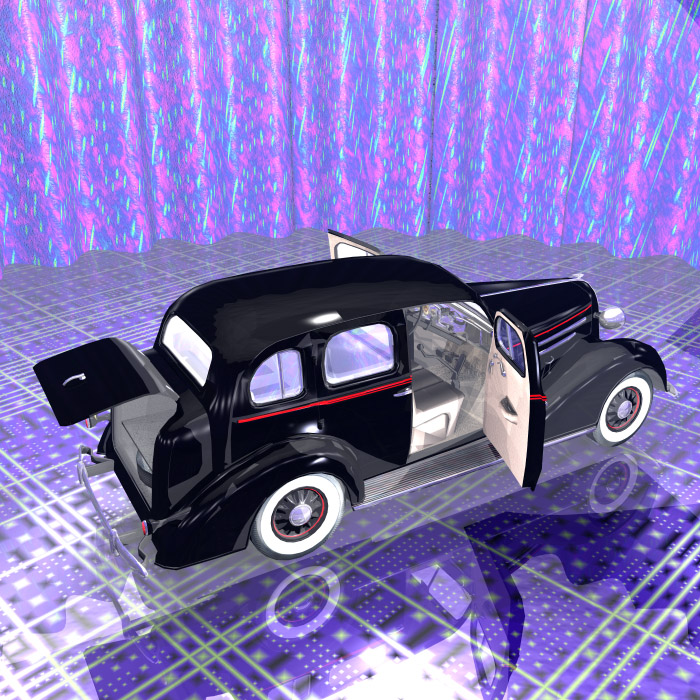
37 Chevy Sedan
I don't know what happened to my text? I guess you cannot cut and past from a word processor.
This was done without HDRI or sunlight again the sedan is inside a cylinder. There are 18 flattened spot lights around the edge of the curtain facing up toward the ceiling.The ceiling is a 2D disk with a light gray material for light reflection. There are 14 flattened spotlights above the car pointing out also in a circle. Then I added a circle of 30 radials around the car midway between the curtain and the car. There is a radial inside the car which made the glass to bright. And one radial inside the trunk.
I located two radials in the dark spots next to the fenders with low lighting.
The car body material is set to 100 diffusion and 100 on specularity and 3.3 on reflection.
This render took about two days. I felt bad about the shadow on the front fender but when you do a render this long there is always surprises.
Comments 7
A conversation around the artworkSign in to join the conversation.
Richter thanks again for you comments. I will need get this scene out and redo until I can get something absolutely stunning. Thanks for the links to the show room cars as it does give a person an idea of what to be striving for.
Render, Way to go man! Wow, that is really taking control of your lighting! I meant to comment days ago on this but I started a new job and have been extremely busy. Has it even been days since you uploaded the image? I'm going crazy! The first thing I notice is the lack of shadows, even directly underneath the car. Make sure that all lights are set to cast shadows. Realism if it is your goal means faking the bounce of your primary lights with secondary radials or spotlights. Bryce does not calculate bouncing light energy as you well know, it can only mirror the colors of other objects via reflection. Only with blurred reflections does this give the false "impression" of light energy bouncing. Thus the need for primary and secondary(ambient) lightsources. You must keep in mind the functions of each. My only suggestion is that you use the secondary light to correct the deep shadows only creatd by the primary light source. This does not mean brightening the shadows too much. In this case you do not have many visible shadows so my feeling is that the lights are all very similar in intensity, too much to specify which lights were primary and which were secondary. Also likely not all lights are casting shadows because I do not see much banding and based on the number of lights used I would expect to see banding. Though you did not set out to render ibl, it seems you have used a light dome of sorts so it just comes down to deciding on a bias of light intensity for greater depth perception within the 2d image. In the Studio Apartment scene the secondary spotlights help tell the story of the primary light coming through the window, that is all but it is profound. Notice that there are still deep shadows in the image. Deep but not pure black. The intensities of the secondary lights get weaker with distance from the primary source. In programs with GI this is calcualted mathematically, in the Apartment scene it was approximated by eye. Another big difference that David points out is that you are dealing with reflection in this case. The Apartment scene most of the materials are matte except for the hardwood floor. Reflection is like adding additional viewers to a scene, the raytracing grows substancially. This is where the time factor comes in. Horo hit the nail on the head, you have gained alot of practical lighting experience through this exercise. I think that if you wanted a photoreal image you would need to restrict your strong lights to one area of the image and use weak lights to lighten the shadows of those darkened areas only. I would be willing to send you the source file for the apartment scene so you can see exactly what I did. Surely this would shed some "light" on the mystery. Surely also, I oversimplified the steps taken in the Daz3d bryceforum"Photorealistic Lighting in Bryce: How and Why?." The goal was to keep it simple but also to encourage others to find their own solutions, just as you have here. I am so very proud that you are willing to take my advice. I consider this image a step forward as you will gain the knowledge to use the lights more wisely through this experience. Also, if you have direct lightsources coming from many directions you may not need to worry about ambient lights because the many strong lights from many directions would overpower the subtle bouncing anyway. One more thing is the color saturation of the materials. David has a keen understanding of this but I have only recently come to understand it. Full 240 saturation of colors in the color pallete in the materials lab looks unreal. The purple, red, blue, I am nearly certain that saturations are very high likely 240. I like to lower saturation to no more than 100 for realism, as real life is never at full saturation. Keep it coming man!
Now that I think about what David was saying about Bryce lightsI was trying to achieve the impossible. No wonder I struggled with this for so man hours. And Horo I might say this scene was not so convincing to me but still wanted to post and was glad I did or I would have been working on it for many hours more.
Most of you remember reading Richter's comments on the scene were I had the two sedans together called (Car Show) http://www.bryce5.com/details.php?image_id=3085. I am going to past his comments here. "but remember that shiny surfaces isn't always necessarily high reflective, specularity is the "hidden" factor. To prove this - look at the top part of the headlights, the upper rend shows traces of spec., that are not present in the lower rend. The case with the car paint is almost the same, though here I only see a little bit of difference in the spec. intensities. I can suggest you to try through spec. to "reflect" as many lightsources from the surroundings as possible. This way not only the paint, but also the curves of the brilliant Chevy Sedan will pop up nicely and the front and back left mud-guards/fenders will be clearly seen. If you're not concerned about the render-times, you could go for an Uffizi HDR backdrop reflection over the car paint." This was the goal that I was trying to achieve. I did ask for some suggestions on the lighting were my Car Show scene in the forum and Horo suggested using the idea from Rashad's lighting scene in the Studio Apartment Scene but did not have much success. So I hope this helps you to understand what I have been trying to do for the last week or so. And yes Horo I am learning allot as I have tried many different lighting arrangements. But need some tips on how to light this car or some other object without hdri or sunlight just to see what car setting. After all this I think some great effects can be done with less lights and placing them in the right places. David just read you comments again as was wondering if Richter's suggestion on reflecting light in Bryce does not work.
Like Horo, I feel it would help to know what you were trying to achieve. As a rule of thumb, I try not to mix large numbers of light sources with very reflective surfaces, the reason being, that in reflective scenes the bounces from the reflections help fill in details about the geometry of the scene for the viewer, with matt (in other words non reflective) surfaces, the shadows take on that roll. In bryce light does not bounce. This is a great dissapointment. Nor does it refract. The only bouncing and refracting that takes place happens to the rays comming from the viewer to meet where the light has hit part of the geometry. Which may sound rather weird, but if you can get your head around that then it helps with working out where to place lights and such. Here the lighting is so even and the surfaces so reflective that only in front of the driver is there some useful shadows forming. However, it would be wrong to criticise the lighting without knowing what your aim was.
Happens to me quite often, that the img description is empty. Must have to do with copy-paste. I've also noticed that my comment is not accepted when I use one single wrong character. With all that trouble you had with that many lights and accordingly long render time, the result not fully convinces me. I have to admit that I don't precisely know what you were after. I like the interior most. However, lighting is difficult to get right and the experience you've gained with the creation of this picture might prove that it was worth the trouble. After all, lighting is at least one half of an artwork.
37 Chevy Sedan I don't know what happened to my text? I guess you cannot cut and past from a word processor. This was done without HDRI or sunlight again the sedan is inside a cylinder. There are 18 flattened spot lights around the edge of the curtain facing up toward the ceiling.The ceiling is a 2D disk with a light gray material for light reflection. There are 14 flattened spotlights above the car pointing out also in a circle. Then I added a circle of 30 radials around the car midway between the curtain and the car. There is a radial inside the car which made the glass to bright. And one radial inside the trunk. I located two radials in the dark spots next to the fenders with low lighting. The car body material is set to 100 diffusion and 100 on specularity and 3.3 on reflection. This render took about two days. I felt bad about the shadow on the front fender but when you do a render this long there is always surprises.