FROM THE COMMUNITY COLLECTION
Baked virtual light and spot
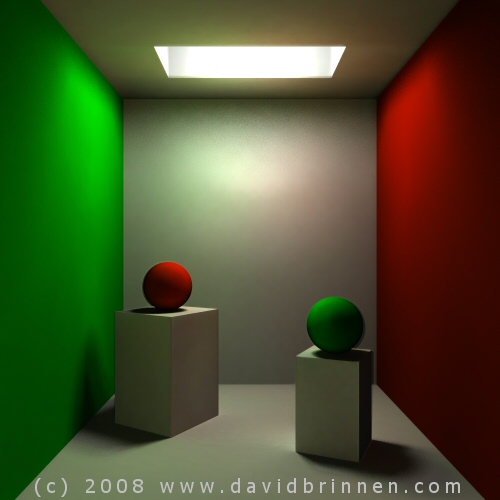
More of the same, only different. In the previous examples I applied the indirect light filter to existing light sources. Then I thought, hang on, I don't need to do that - since the light is bouncing around all over the place any point in space has light passing through it, so any point can be a valid light source as far as the render is concerned. So I set up a main light in the hole above the scene (soft shadow 100)and rendered all materials using speculative halo 255, reflection 100, metalicy 100, ambient 100, on premium 36rpp soft shadows, blurred reflection and true ambience at ray depth 3. This way I could capture the shadows from the real light source for the virtual light source. I created two pre-baked virtual light sources for this scene, one a spot aligned with the camera and another hovering in the room under the light hole. I processed these in Paint Shop Pro8 (PSP8) to decrease the noise level and mapped them accordingly to a spot and a single point light source. For the final render I also included the existing light source with soft shadows and rendered the baked lights with soft shadows also all in premium at 36 rpp. Final render time was 7 minutes 50. The filter renders, of which there were three took about 40 minutes in total. The mapping accuracy is better than the precious examples and the light which finds itself back onto the ceiling area is an eye pleasing effect.
Comments 4
A conversation around the artworkSign in to join the conversation.
This one's truly a success. It really looks like the light is being bounced around, just as convincingly as real global illumination... though this takes a little more work! I figured that the green and red balls would bleed some color onto their pedestal... is that the case?
This looks very good, indeed. I particularly like how the back wall gets some of the colours bled off the other walls. Have I got that right: you didn't use radials but some sort of spots. Mapping gels on spots works.
Aye, thanks. Each itteration is providing insight into how to improve the mapping, although I've not nailed it yet, I don't feel it is beyond the realms of possibility. In this example I placed a spot with the camera, but I've since decided this was not an optimum possition. Although this example has freed me from the idea of placing the gels on the lights themselves I was still conservative in my placement of "vertual" lights. In this scene, I now reason vertual lights should exist where a) the most light is passing through a point is space and b) close to the most complex geometry. Reason a) for the benifit of best shadow simulation and reason b) for best mapping of gel - gel mapping of course breaks down into pixels over long distances, so if the object is close to the camera and the gel is distant then there is overspill. I've only used low rez gels so far to keep render times low enough for swift development of the method, however, once I have a fixed method then the computer can be left overnight creating monster gels which will give 99% accuacy within the render. Combined with several virtual light sources for each "real" source, this should provide enough colour and shadows to give a scene which will pass all but the most critical of scrutiny. I know it will never be perfect, but I think it can be honed to being just about good enough to be viable in terms of render time and difficulty. The main advantage of this technique as I see it, is that once you have the scene built and then converted the scene for indirect mapping, you are free to generate as many virtual light sources as you need for very little further imput. Also once the final scene is set up, (given that I am going to abandon the idea of the spot alongside the camera), the render is swift enough for a lot of fine tuneing - something I'm very fond of but often costs, with day long renders being the norm, quite a lot of time.
This looks really good David. For the most part I find the indirect light simulation convincing. The bleeding of the walls onto the enviroment is subtle and very believable. The corners of the room are working for me too. The problems are subtle also but once observed hard to ignore, particularly the green shadow the green ball casts onto its rectangular stoop. Also the red ball casts a similar shadow. I am guessing that this is because you are projecting the light and the shadows into the scene based upon previous renders captured and filtered as gels. The final resolution of the image needs to be high enough that the colors do not bleed together as they appear to here. Likely you could eliminate the color saturation in psp8 before loading the gel, though that would be tricky if the surfaces were not so uniform. The green ball also seems slightly out of focus. But this is likely due to a lack of perfect matching of the gels as they project all light and color into the scene. The mapping seems tough, really tough. But you have made it look easy here. I am being extra critical surely. I think the scene looks really good and I would not assume this was a Bryce render from first glance.