FROM THE COMMUNITY COLLECTION
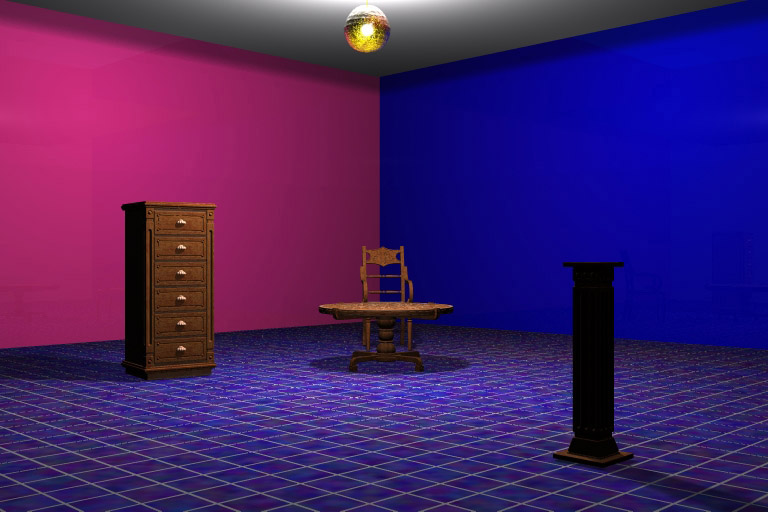
Lighting Test Exhibit A
This is the same method as before in my last test but this time with the sunlight turned off. And yes Rashad I turned of everything I could find in the sky lab and there went my shadows. This render is a Regular Render as I did discover the shadows seem to be the culprit that really slows things down. This took about an hour to render on my dual processor but was not set to high priority. So this could be 3 to 4 hours on Premium. We keep saying we want a shorter render time but how do we decide was short is? If it was not for the render time I would think this is looking better but need comments from those who have a better eye. The one thing that would be my concern is the dark backside of the objects.
Comments 3
A conversation around the artworkSign in to join the conversation.
Thanks again for the input. Yes I see those dark shadows and I have been trying to get rid of them by turning up the lights outside the walls on the opposite sides of the shadows.But it is not working only makes the room brighter. Rashad, I was working on adding some lights and must have had them to bright as it started to compromise the shadows. But I will give it another try with some of your tips.
Yes, I can see this as a study. The shadows are deep but in my opinion it is not the shadow depth but more the fact that you have not set up any weak secondary lights to fill in the shadows naturally. I think that you are finding a healthy process. which is to establish your bright lights first, allow the shadows to fall as they may. That is step 1 and you have got it made. Step 2 now is to introduce very very weak or low intensity environmental lights to fill in the environment. The shadow of the object at right would benefit from a low intensity light right in front of the camera. It must be very low in intesity so that it does not compete with the direct lightsources. You could even add bounce lights...yep I said it. place a blue tinted radial along the blue wall and a pink one along the pink wall and do this to each wall. This will give you all the indirect light you need while faking GI and bleeding the colors onto the models. If you keep all lights hard shadow the render will be very fast. The render would be faster than you think.
The dark shadows: reduce shadow intensity in sky lab. The shadows as such make sense. They are just too deep.