FROM THE COMMUNITY COLLECTION
At the Beach
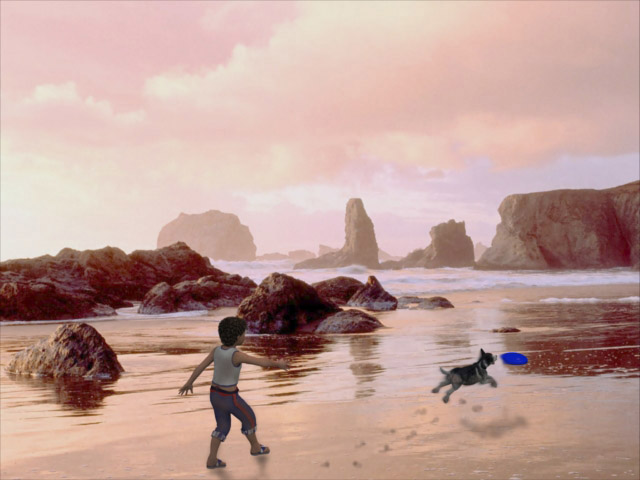
Before anyone gets to excited this is a real picture for the background. The boy and dog and the frisbee were added. I used Photoshop to create some shadows and a little sand on the Matt's cloths and off course the doggy prints. Added some blur to the dog and frisbee. This was done in Carrara 6pro. I made the lighting pink to match the picture so the objects blend in with the backdrop.
Loading unique views3,719 unverified legacy hits0.0 archived rating2008-05-29 added
Comments 8
A conversation around the artworkSign in to join the conversation.
Thanks spektyr I thought the boy playing with his dog blended in nice and it does have a heart warming feeling. Horo, It took me some time to figure it out and why I was so confused. I was thinking the reflection from the rocks was shadows. And this was the point you were making as there were no shadows on the sand.
This has the look of a finely detailed painting. The scene itself is heart warming: a boy and his dog at play. Nice work here! ;-)
Horo, I should have read a little slower. I did notice in the picture that the strongest light comes from the left but the shadows on the rocks seem to be more center. You are correct about the shadows on my objects I noticed this soon after I posted. Sorry about my confusion.
You misunderstood me RenderMan - or rather, I was not clear enough in what I was saying. Nothing wrong with the picture and the shadows (or lack thereof). What I meant is that your drawn-in shadows do not match the direction of the light in the picture. I understand that you cannot change the direction of the shadows in the background picture, but you can adjust the shadows the objects you added cast. Sorry for the confusion I created.
Thanks again for the comments I was wondering were everyone went this week. Horo, I take no responsibility for the picture accept finding it on the net for free. I did notice the shadows later but am not sure what is going on. Rashad, I think Carrara works well with background pictures with the HDRI. The pictures seem crisper but it could be that I don't know how to use the background pictures in Bryce. FoxBoy the sand should blend in very well as it is part of the picture. Ha Thanks for you comment and was glad to see your post.
Background work is great. The water blends in with the sand perfect.
This is indeed a nice "hybrid" work. It isn't easy to get the shadows right. Looking at the rocks, the light comes from the left. Looking at the shadows, the light comes from the brightest spot visible in the sky. There are no shadows from the rocks on the sand.
Looks good. No complaints. The hand drawn shadows seem to work well. The background is a photo, but it looks like it has been processed, perhaps saturation or contrast enhancements. Nice work. The pink tinted lights do a great job of blending the models in with the background. If only Bryce handled backgrounds as easily as Carrara.