FROM THE COMMUNITY COLLECTION
There Coming
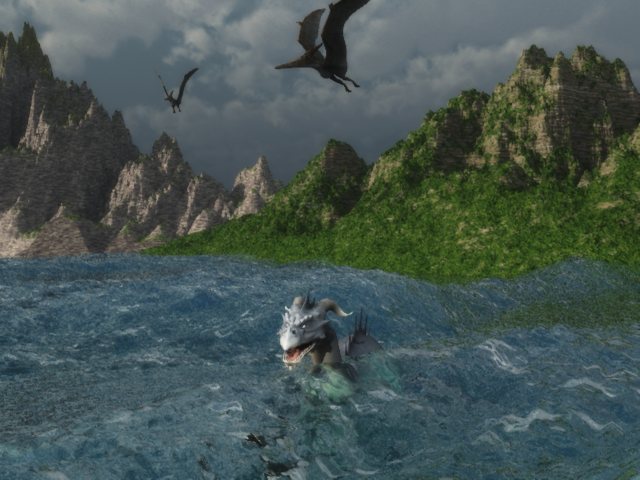
Vue again with some Daz objects imported as Wavefront Obj. They seem load in just find but I had to include make sure the maps were checked when exporting and change the scale size considerable. The water does not look to bad considering I am still learning. I used a spot light on the sea dragon. Not meant to be a great piece of art but was a test to see if I could get models from Daz to import.
Loading unique views3,846 unverified legacy hits0.0 archived rating2008-06-13 added
Comments 4
A conversation around the artworkSign in to join the conversation.
Can't add more than that this is not sufficiently lit, except the dragon in the water. This scene needs another mountain range behind the one we are seeing. Hard to believe the sky is not a photograph - or based on a photograph. The coast looks strange. I understand there are high waves, but nevertheless. We are above the water. Perhaps the dragon would see it this way.
The water and the mountains look a bit grainy. Clouds are realistic, thougt it was a photo at first glance. Much better than the bryce-clouds.
Some good questions and points. The water mats that come with Vue are very slim.But just used my $15.00 gift certificate and purchased some more water and ground materials. I am learning how to use the what is called the Basic Materials Editor and did make a water mat for another scene So I could experiment. Easel doe not have all the great features as E-ON's other programs as this is Vue 6 easel is the entry level program. This doe not have the volumetrics but the other programs like Vue Studio does. The manual for Vue says I can use a higher resolution for the terrain but suggests against it as it really slows the render down and they say that this resolution for terrains works well for most applications. The texture may have more to do with the lighting than the resolution. I was using what is called superior render setting which took 2 hours and 17 minuets for this scene. After the render is finished a screen pops up and offers post render options such as Film Settings with Natural film response and Auto-exposure and then you also have lens glare settings and color correction and color filtering. You can go to their site and look at the galleries but you have to keep in mind that not all are using easel but they are all Vue programs. I posted my tree scene in the beginners gallery. But I had not better say much more or I will sound like an advertisement. Ha
I think you should continue to develop this scene. I like the way the light strikes the dragon submerged in the water. The background and surroundings however seem a bit dim by comparison. The terrains might benefit from some smoothing. I am curous if Vue offers an easy solution for foam at the edges where water makes contact with land. The sky seems dim in color, low in contrast. What render settings are you using, are you using GI? Lots of questions of you don't mind me asking?