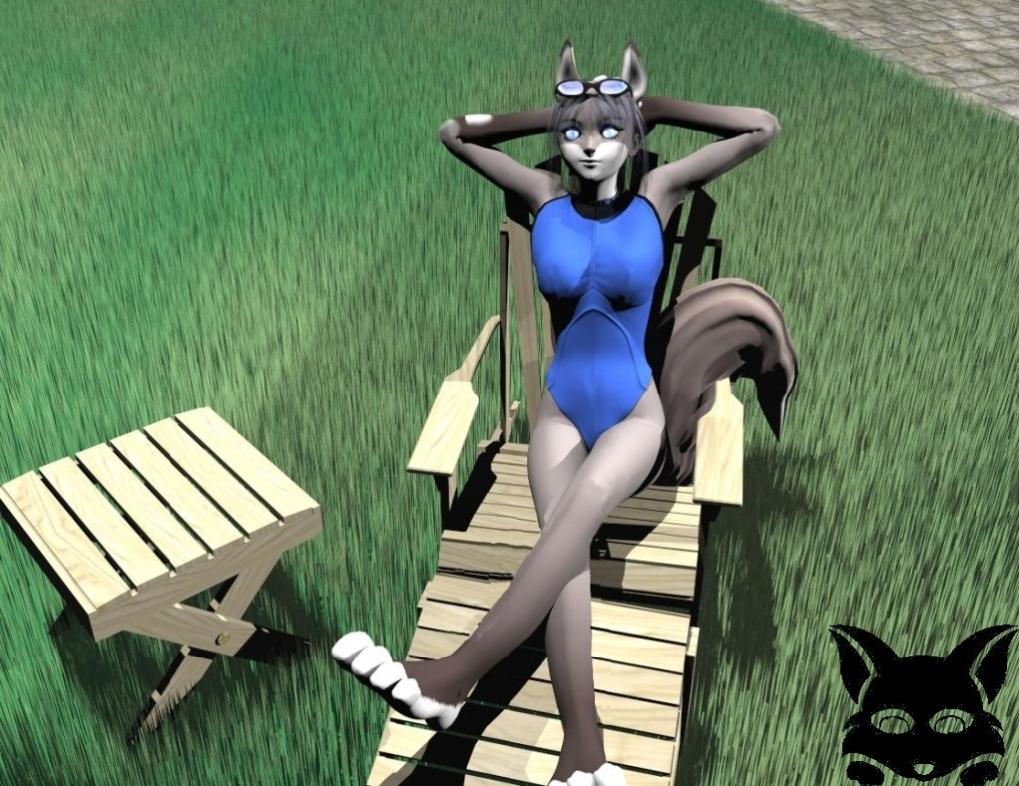
Nice to see you post this nice relaxing scene. I think she looks very comfortable in this lawn chair. I do agree with the other observations but will say the suggestions I have received here have helped me improve. Keep up the good work. I don't remember what the default eyes look but this is looking good. Did you do the eyes in Bryce?
RI
richterArchived
Yes, she is nice alright ;) You should be saving images with higher quality, you got enough space available. You didn't include any description so I'm not sure if you were testing a grassy landscape or some materials, or lighting. The way you're creating the grass is effective and far less memory consuming. One has to work hard to bend the "spikes" if those are to be trully representing grass. So I can suggest you here to use more terrains in certain "random" combination all around the Foxie, this way you'll have plenty of control over the texturing, the shape of the blades of grass and the positioning of the terrain tiles. A good randomization is always a plus within nature-based scenes. At least from my experience. The other thing that perhaps will need some work is the lighting. Looking at the shadows I'd say your FoxGirl is enjoying the sun, but the sunlight seems to somehow "wash-out" the scene. Check to see if you have "Gamma Correction" applied. If so you should turn it off and restrain of using it. While in some cases it works prefectly for a chosen scenario, most of the time the results aren't beneficial. You can still put some rocks/models here and there to fillup the empty spaces.
FO
FoxBoyArchived
I plan to add more characters and work to being something new to the table. I'm having some trouble with finding a decent fox model. Though I'm really happy how the eyes turned out, they seem to work way better than the default ones I use.
HO
HoroArchived
Nice bunny - ahm, foxie. Her pose is quite good. Grass is a bit of a problem, too regular but then, it is not easy to make in Bryce without a huge amount of polygones. Good work.
Comments 4
A conversation around the artworkSign in to join the conversation.
Nice to see you post this nice relaxing scene. I think she looks very comfortable in this lawn chair. I do agree with the other observations but will say the suggestions I have received here have helped me improve. Keep up the good work. I don't remember what the default eyes look but this is looking good. Did you do the eyes in Bryce?
Yes, she is nice alright ;) You should be saving images with higher quality, you got enough space available. You didn't include any description so I'm not sure if you were testing a grassy landscape or some materials, or lighting. The way you're creating the grass is effective and far less memory consuming. One has to work hard to bend the "spikes" if those are to be trully representing grass. So I can suggest you here to use more terrains in certain "random" combination all around the Foxie, this way you'll have plenty of control over the texturing, the shape of the blades of grass and the positioning of the terrain tiles. A good randomization is always a plus within nature-based scenes. At least from my experience. The other thing that perhaps will need some work is the lighting. Looking at the shadows I'd say your FoxGirl is enjoying the sun, but the sunlight seems to somehow "wash-out" the scene. Check to see if you have "Gamma Correction" applied. If so you should turn it off and restrain of using it. While in some cases it works prefectly for a chosen scenario, most of the time the results aren't beneficial. You can still put some rocks/models here and there to fillup the empty spaces.
I plan to add more characters and work to being something new to the table. I'm having some trouble with finding a decent fox model. Though I'm really happy how the eyes turned out, they seem to work way better than the default ones I use.
Nice bunny - ahm, foxie. Her pose is quite good. Grass is a bit of a problem, too regular but then, it is not easy to make in Bryce without a huge amount of polygones. Good work.