FROM THE COMMUNITY COLLECTION
Mountain Pass
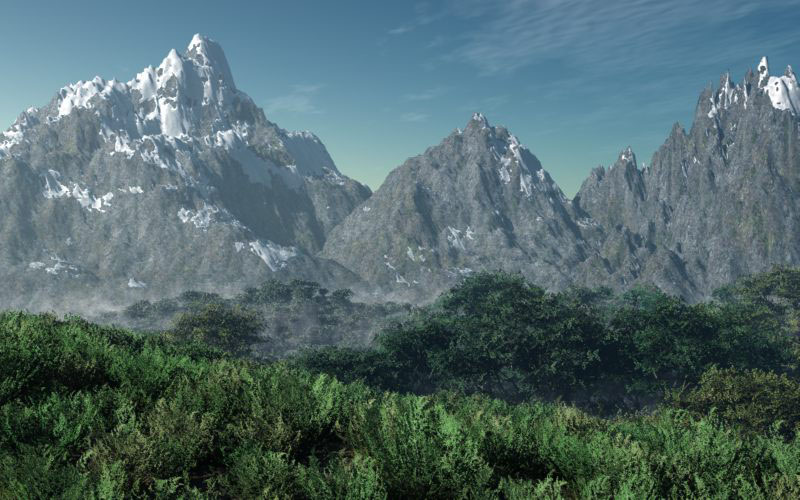
Vue 6 Studio Pro This was done as the result of following a tutorial on landscapes. This scene consists of about 7 terrains. The foliage and treesis added by what is called the ecosystem I tried to adjust the size of the trees to create distance. This is a very simple scene with not eagles or airplanes but some nice plants and trees with some fog.
Loading unique views6,814 unverified legacy hits5.0 archived rating2008-07-12 added
Comments 10
A conversation around the artworkSign in to join the conversation.
Not much to add :) The lighting seems very good. The way the snow covered the peaks suggest that the mountains are far bigger then they are presented here. After you change their resolution it might be a good idea to place some trees in the low parts of the mountains as well. The trees in foreground seems odd for some reason. It's something like a mix of not well defined branches and leaves. The reason behind this is probably the jpg compression you used and/or the quality of the Vue render settings. Considering the size of the final image I think it won't be a problem to bump up the quality to the maximum allowed. Overall looks good, the lighting is what I like best in this particular scene.
WOW! This is Gorgeous!! Looks very natural! Practically photorealistic! GOOD JOB!!!! 5/5
Horo, I was wondering were you went thanks for the comments. And yes I agree with with you on the low poly mountains. The lack of sharpness may have been caused by the haze and fog settings which were applied in this scene. But Vue doe have a render all of its own. Hmmm I wonder what you see in your minds eye behind those mountains?
Agreed, this is a nice scene. The fog is particularly good. Apart from the low poly mountains, I miss something behind those mountains. They look very isolated. Vegetation and sky are very good. The picture is slightly unsharp, I think this is the Vue renderer.
No still the same workaround theory applies in the new rig. Until they make some changes to the sky lab this is how it will be, a workaround for pretty much everything involving the atmosphere.
Connorzenlinsky, Thanks for you comments this program as Rashad points out is not Bryce but each have there unique features. It is really amazing what the program will do but also costs a little more than Bryce. Rashad, I will be anxiously awaiting your light rig. I have been thinking about ways to make the sun stronger without having to do allot of work a rounds, so hope you have come up with something.
Renderman, The Bryce eco-system I am referring to is not nearly as advanced as Vue mind you. It requires some cleverness from the user. For variation of color you can use a world space mapped material with variations of green in the texture. By being mapped world space it will spread the color over the landscape allowing different branches of the same tree to look like different trees. Vue's Ecosystem is better surely. Bryce could create a similar thing if they would create a lab and use the hidden branch theory to rig real eco-systems. Oh well! P.s. I have made some very cool revisions to the sunlight rig scenario I e-mailed to you before. You should get an e-mail from me soon. Later bud!
Wow that is amazing. I have tried to do outside scenes like that but have not done very well. My favorite is the fog right above the trees.
Rashad thanks for the comments. You have a good eye as you are right about the terrains. I was wondering why the in the tutorial they did not suggest a higher resolution. The resolution is the standard 256X256 which is a very low polygon count. I was conscience of the fact and could have changed it but was focusing on following the tutorial at this point. The one feature in the EcoSysteml I like is you can adjust the colors of the plants by using a gradient color bar so the plants are populated with various colors or green or any color you wish. The same is also done for trees. This is used more for the trees and plants in the foreground. You mentioned this idea of using tree with allot of branches to me when I first joined Bryce5. I still have never tried it. But then there is the color variation problem. In nature not all trees are the same exact color. Thanks it was my first time to be in the galleries. I noticed that you along some others have made it in the galleries several times and was hoping someday I would be able to get my art to pass. I have entered several times and was glad see I finally made it. It was nice to get the voucher but being a Platinum Member makes it hard to find things to use the voucher for. I still agree with your comments on this scene that was in the galleries when I posted it here. It could have used some more sunlight which would have added to the scene. A big thanks to all who have helped me at Bryce5.
I like it. I like the sky color. The terrains seem good but perhaps slightly low in polygons, low resolution? The vegetation is great. I have often noted with Vue renders that the leaves of the trees sometimes appear flat, like the leaves are drawn onto flat discs. It is not entirely obvious in this render but if you observe a good number of Vue renders you will begin to see the leafy flatness. Bryce trees depending on the leaf shape can also produce unnaturally flat leaves. That is why I like the default leaf shape it has a nice curvature. Eco-systems can be riggen in Bryce also by taking a tree with alot of branches and small leaves and placing the tree so that the trunk is hidden. In this case each branch of the tree looks like an individual tree sticking up out of the ground. Just so you know. Congrats on making it into the Daz Bryce galleries this month!