FROM THE COMMUNITY COLLECTION
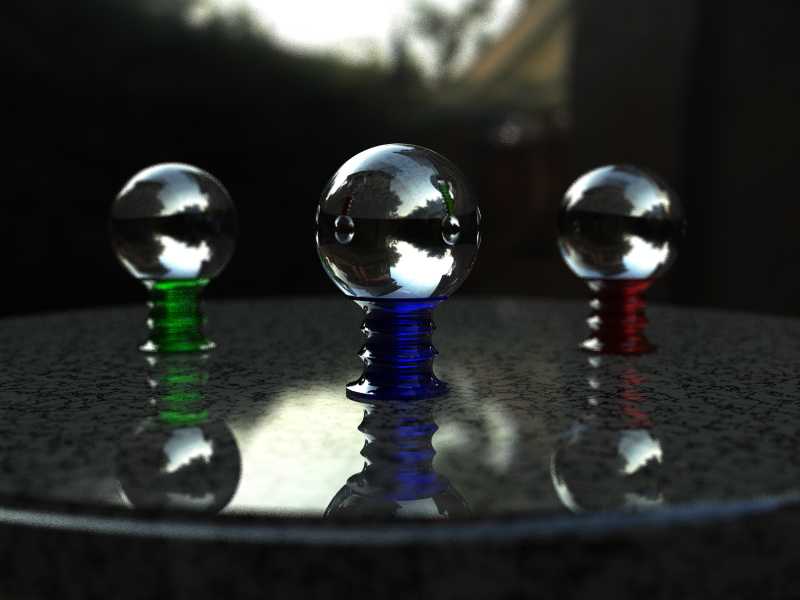
IBL Test with DOF
Thanks to Richter for his tips on DOF! I rearranged things a bit and focussed on the center ball. I pushed the RPP up to 36 but the blur is still a bit grainy. It does solve the problem of the low-res HDRI by blurring out the pixelation. The refraction of the background in the in-focus crystal ball doesn't show the pixelation either. All in all this is a better version than the first. I used a Lens Radius of 0.20, which gives a strong DOF effect and nicely accentuates the target object. I may push the RPP up further to clean up the graniness but that will take a lot longer to render. This one took about 3 hours. All comments are welcome and appreciated.
Loading unique views4,781 unverified legacy hits0.0 archived rating2009-08-20 added
Comments 4
A conversation around the artworkSign in to join the conversation.
Hey, Spektyr, a little bit of noise here and there doesn't hurt. Quite on the contrary - you know that an actual digital or chemical photograph will always have a minimum level of noise in it. Though if the extreme fine anti-alias is a priority of your composition, settle for no less then 256 r/p. Of course - you decide, buddy. Keep going!
Thanks Guys, I wound up pushing the RPP up to 144 and now the grain is hardly noticable. I'll have to play around with Horo's suggestions later. The Final version I posted really looks photorealistic. It would take a good eye to tell the difference. ;-)
Very good. I think the average person who is not familiar with 3d would swear this was a real photograph. Very good and simple.
This is much better. The HDRI is playing bad tricks with the noisy blur. Plop render the part of the visible outside HDRI with max rpp. This should run fairly fast. As an alternative, render an object mask and blur the HDRI with a Gaussian blur. Than combine the render with the blurred HDRI using the mask. If you have the free HDRShop and the free Banty's plugins, you can use MyFilter with an appropriate convolving mask (all ones might do the trick). Then, render again, without the objects, just the HDRI. That's swift, too. Then combine both renders using the mask. HDRShop can also handle LDRI and you could use the calculate option to combine the renders and save it as BMP - a*C + B*(1-C) would be the operation.