FROM THE COMMUNITY COLLECTION
Remembered
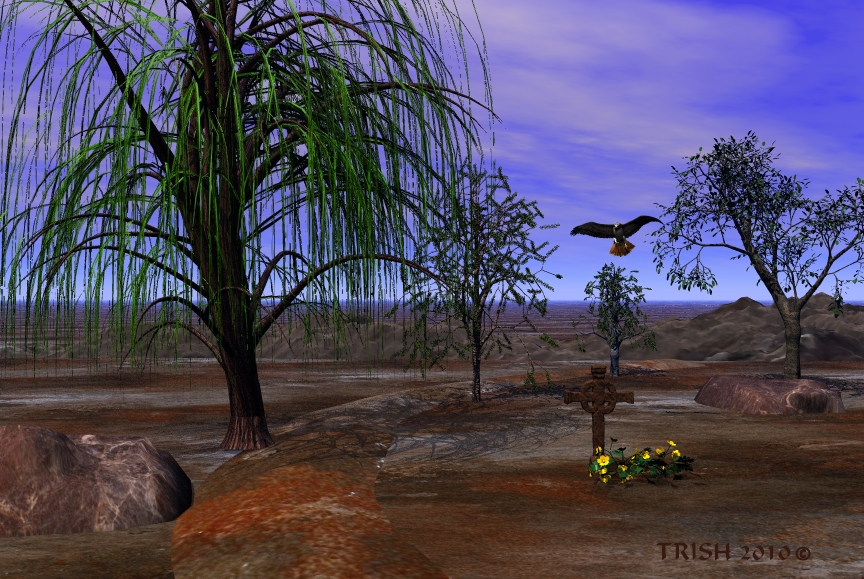
I need everyones input on this one..the ground is really bad I know
Loading unique views3,349 unverified legacy hits0.0 archived rating2010-02-26 added
FROM THE COMMUNITY COLLECTION
I need everyones input on this one..the ground is really bad I know
Comments 4
A conversation around the artworkSign in to join the conversation.
ok now.. the 1st thing that comes to my mind - unify the trees. They're too different right now. Also, for this type of sad scenario - avoid too bright and saturated colors such as the green of the weeping willow or the strong yellow of the flowers near the grave-cross. If you intentionally want to focus the viewers eye on something, then such colors could be appropriate, even though you should always pay attention on how this influences your overall composition. Just move back a bit and half-close your eyes. If the colored thingy pops-out too much based on the rest, work on its desaturation more. Consider more sinister sky (I think that's out of question, but... anyway Trish :) ). Now your nice ground. i do think it's nice, really. The only thing it needs is strong bump or high-res terrain from the terrain editor (1024x for ex.) Make some spikes, paint some erosion with the brush (if you're as patient as I think) and finally flatten everything drastically - either from lowering the terrain height in the Terr.Editor or squish it once you close the editor. Since the terrain takes the most visual space in your current setup, I suggest you to work on it first. The way you create it will literally guide you further on how will you approach your composition, meaning - trees, rocks, sky, etc.
Technical considerations aside, this is a sad picture. It's not the grave, it's the surroundings. I think you made a good job with the ground. Looks a bit like blood. I don't like it, but it fits and contrasts nicely with the blue of the sky. The weeping willow looks nice, too. I'm not sure this scene would profit from a strionger sun light - it may look more real with a stronger light, but that might spoil the impression.
Truly, I don't know, what to sya. It is like wasteland or marshland with few trees growing there...
What are your goals with this piece? I can already tell you the visual impact will be slightly greater if you increase the sunlight intensity just smidgeon. It is not a bad idea to exaggerate direct sunlight by roughly 5%, at least for me. It makes it easier to believe that the light is real sunlight. If you are using the default sun, switch to a radial for sure. The Bryce 7 beta shows controls for a new type of radial called Distant Light. This tool sounds like it would be a great replacement for your sunlight. If you are using Bryce 6.1 or 6.3, I am think you qualify for the new beta. It offers a means of placing trees and plants to make your job easier and more rewarding.