FROM THE COMMUNITY COLLECTION
Pfaffort mix
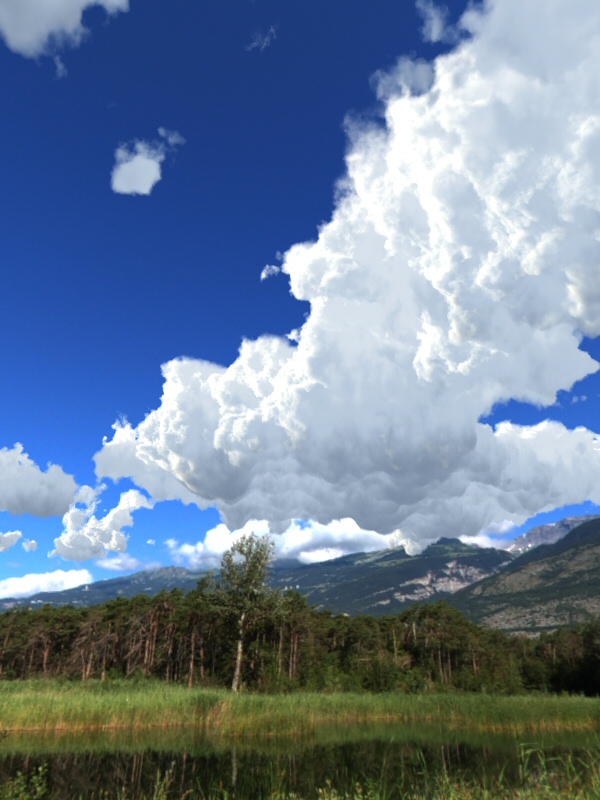
Here is another way of controlling the clouds and where they appear. If a slab is used, set the slab attributes to positive. Then take (for example) a clynder and set it's attributes the intersect. Modify the material of the clynder so that it is fully transparent and use the blend transparecy mode (just to be on the safe side). Now group the clynder with the slab. Once this is done clouds will only form within the confines of the clynder (provided the clynder overlaps the slab). This method was used in the following image to prevent the clouds from spilling down over the mountains and obscuring the trees. The background image is Horo's Pfaffort from here http://www.daz3d.com/i/shop/itemdetails/?item=10377 and the clouds I took from here http://www.daz3d.com/i/shop/itemdetails/?item=11032
Comments 7
A conversation around the artworkSign in to join the conversation.
Clouds of gorgeous, David! Thanks for the idea of grouping the cylinder and the plate. I've already applied it in practice.
Nice experiment. I think what is amiss is that the clouds seems a bit too sol;id, and too much like styrofoam to be convincing. The height of the cloud plane is also a bit extreme, but I think it is still within the realm of plausibility.
These are some great stuff!! i'm a fan of them and will try to use these examples in a scene, just to see what happens!
Thank you for you kind words. Having a video officially published by DAZ within a bit over a day is certainly amazing. At dirst glance, this render is beautiful and real looking. The darkness of the underside is not wrong. It is rather that it appears to be a bit on the bumpy side. There are clouds in the backdrop and the clouds from the slab, brightness matches nicely. Main issue here is the highly saturated sky. If we only could remove a bit of blue. But we can't yet.
Horo's new IBL video's Just to point out, Horo's got two new IBL video's here http://forum.daz3d.com/viewtopic.php?t=145803 (last two in the list at the moment) and they are very good. I learned two new things from watching the first video alone and I consider myself well versed in IBL so that's my recommendation. Here's my advertising style quote "Possibly the most informative ten minutes you will spend in front of your computer!" said Bryce user davidbrinnen. What you are still here? Go and watch the videos! Seriously, go. No, don't read this. Look stop it, please, it's not even funny anymore. OK here's the link again. http://forum.daz3d.com/viewtopic.php?t=145803
Just tested it with "burning tyre smoke" applied to a sphere and intersected with another sphere. It works with that. However, given the way volumetric materials map onto primitives other than slabs, I would suggest the application is limited and not as suited to clouds as slabs. As for realism, the give away for me is the dark underbelly of the cloud, it looks a little bit too pregnant. I tried to correct for this but it compromised the material above.
Very nice! To the untrained eye this would appear to be a photo. I'll definitel be using this technique, though I have to ask, does this method work with any volumetrics, or just those that are applied to slabs?